Templates · Home screens · Education app · Zenith
Zenith Tonight screen
A home screen from Zenith, a night sky guide app template in a Dark-first style. Screen 4 of 25.
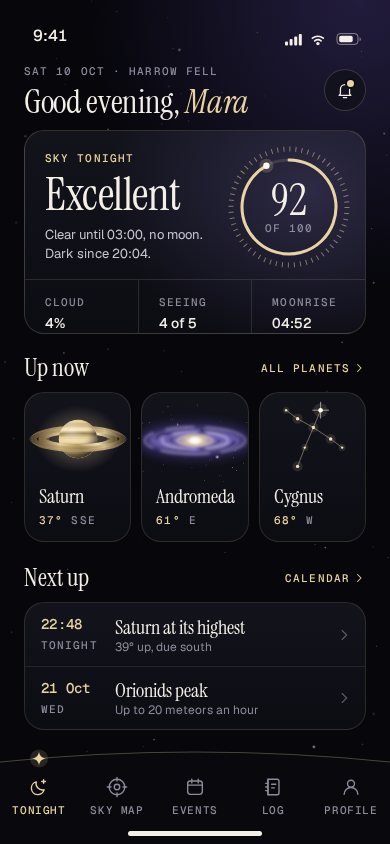
Zenith is a complete stargazing app: welcome, sign in, choosing an observing site, tonight's sky at a glance, a round sky map with a time ruler, search, planets and a planet page with an altitude curve, constellations and a constellation plate, a deep sky object, the moon, an events calendar and a meteor shower, the seeing forecast, a light pollution map, an observing log with a new entry and its confirmation, telescope tips with a step by step lesson, a Plus plan, notifications, profile and settings. Everything reads like an engraved star atlas lit in pale gold.
| Detail | Value |
|---|---|
| Screen type | Home |
| App | Zenith: Night sky guide |
| Category | Education |
| Design language | Dark-first, dark |
| Type | Geist |
| Colours | #06060b background, #101018 surface, #f5f0e6 text, #8f8b9c text-muted, #e9d3a0 accent, #17130a accent-contrast, #9d8cf0 secondary, #2a2620 border, #f0766a danger |
What this screen says
- Sat 10 Oct · Harrow Fell
- Good evening, Mara
- Sky tonight
- Excellent
- Clear until 03:00, no moon. Dark since 20:04.
- 92of 100
- Cloud
- Seeing
- 4 of 5
- Moonrise
- Up now
- All planets
- Saturn
- 37° SSE
- Andromeda
- 61° E
- Cygnus
- 68° W
- Next up
- Calendar
- 22:48Tonight
- Saturn at its highest
- 39° up, due south
- 21 OctWed
- Orionids peak
- Up to 20 meteors an hour
- Tonight
- Sky map
- Events
- Log
Around it in Zenith
More home screens
- Leaf Home: E-books and reading
- Almanac Explore: The free encyclopedia reader
- Tiles Today: Daily word and number puzzles
- Stacks Home: Borrow e-books and audiobooks from your library
- Penpal Partners: Language exchange chat
- Lexis Today: A word a day
- Quanta Home: Interactive physics lessons
- Cram Home: Exam prep and mock tests
- Quad Today: University campus app
- Palm Home: Learn sign language
- Epoch Today: History on a timeline
- Wren Home: Early reading for kids
Every education app home screen
What makes a good home screen
- Put the most important thing first. Decide the one thing most people come for, like today's workout, a balance or the next booking, and give it the top of the screen.
- Make it feel current. Greetings with the time of day, today's date, fresh numbers and recent activity tell people the app is alive and about them.
- Keep quick actions within thumb reach. The two or three things people do most should be one tap away, in the lower part of the screen or a floating button.
- Group related content in clear sections. Use headings and spacing so the screen scans as a few blocks, not a long mixed list.
The full home screen guide and every example
Remix Zenith free: describe your own app and it is drawn in this design. Or get its files from $10: Figma, React Native, SwiftUI, Flutter and HTML.