Templates · Home screens · Education app · Cram
Cram Home screen
A home screen from Cram, an exam prep and mock tests app template in a Gen Z style. Screen 4 of 25.
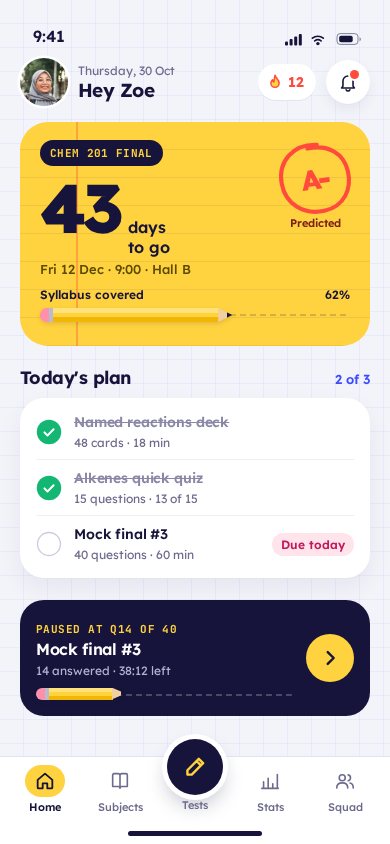
Cram is a complete exam prep app: welcome, pick your exam, sign up, a home with the exam countdown, a predicted grade and today's plan, subjects with unit mastery, search, index card flashcards, a new card form, mock tests with a brief, a timed question with bubble sheet answers, the answer sheet, results with a red pen grade, a topic breakdown, a worked explanation, stats, a study plan, a focus timer, a study squad leaderboard, Cram Plus with checkout, notifications, profile and settings. Graph paper and ink navy with pencil yellow, eraser pink and red pen.
| Detail | Value |
|---|---|
| Screen type | Home |
| App | Cram: Exam prep and mock tests |
| Category | Education |
| Design language | Gen Z, light |
| Type | Lexend |
| Colours | #f3f4fa background, #ffffff surface, #16143a text, #6d6b8c text-muted, #ffd23f accent, #16143a accent-contrast, #3d4bff secondary, #e3e4f0 border, #ff4a3d danger |
What this screen says
- Thursday, 30 OctHey Zoe
- CHEM 201 FINAL
- 43days
- to go
- Fri 12 Dec · 9:00 · Hall B
- Predicted
- Syllabus covered 62%
- Today's plan
- 2 of 3
- Named reactions deck
- 48 cards · 18 min
- Alkenes quick quiz
- 15 questions · 13 of 15
- Mock final #3
- 40 questions · 60 min
- Due today
- PAUSED AT Q14 OF 40
- 14 answered · 38:12 left
- Home
- Subjects
- Tests
- Stats
- Squad
Around it in Cram
More home screens
- Studyhall Home: Free lessons and practice for school
- Tutor Home: Book online tutors for any skill
- Leaf Home: E-books and reading
- Almanac Explore: The free encyclopedia reader
- Tiles Today: Daily word and number puzzles
- Stacks Home: Borrow e-books and audiobooks from your library
- Penpal Partners: Language exchange chat
- Lexis Today: A word a day
- Quanta Home: Interactive physics lessons
- Quad Today: University campus app
- Palm Home: Learn sign language
- Epoch Today: History on a timeline
Every education app home screen
What makes a good home screen
- Put the most important thing first. Decide the one thing most people come for, like today's workout, a balance or the next booking, and give it the top of the screen.
- Make it feel current. Greetings with the time of day, today's date, fresh numbers and recent activity tell people the app is alive and about them.
- Keep quick actions within thumb reach. The two or three things people do most should be one tap away, in the lower part of the screen or a floating button.
- Group related content in clear sections. Use headings and spacing so the screen scans as a few blocks, not a long mixed list.
The full home screen guide and every example
Remix Cram free: describe your own app and it is drawn in this design. Or get its files from $10: Figma, React Native, SwiftUI, Flutter and HTML.