Templates · Home screens · Education app · Epoch
Epoch Today screen
A home screen from Epoch, a history on a timeline app template in a Brutalist style. Screen 4 of 25.
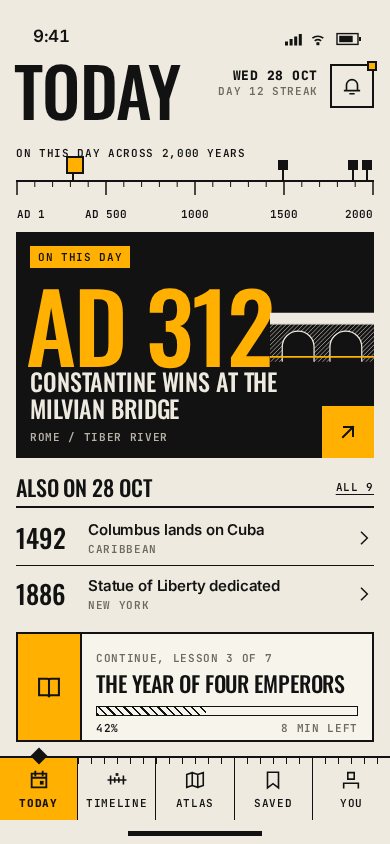
Epoch is a complete history app built around one long timeline: welcome, era picking, sign in, an on this day home, a zoomable timeline of five eras, an era page, an event, a historical figure, search, a reading lesson, an audio episode, a dot matrix atlas with a year scrubber, a meanwhile view of parallel civilisations, a quiz and its score, saved items, a personal timeline with an add event form, progress stats, notifications, a Pro plan with checkout and confirmation, profile and settings. Limestone and ink with signal amber.
| Detail | Value |
|---|---|
| Screen type | Home |
| App | Epoch: History on a timeline |
| Category | Education |
| Design language | Brutalist, light |
| Type | Oswald for headings, Inter for text |
| Colours | #eeeae0 background, #f7f4ec surface, #121212 text, #6e6a60 text-muted, #ffb000 accent, #121212 accent-contrast, #121212 secondary, #121212 border, #e0402a danger |
What this screen says
- Today
- Wed 28 OctDay 12 streak
- On this day across 2,000 years
- On this day
- AD 312
- Constantine wins at the Milvian Bridge
- Rome / Tiber river
- Also on 28 OctAll 9
- Columbus lands on CubaCaribbean
- Statue of Liberty dedicatedNew York
- Continue, lesson 3 of 7
- The year of four emperors
- 42% 8 min left
- Timeline
- Atlas
- Saved
- You
Around it in Epoch
More home screens
- Recall Home: Flashcards and spaced repetition
- Numo Home: Kids maths game
- Syntax Home: Learn to code
- Tuckin Home: Bedtime stories for kids
- Zenith Tonight: Night sky guide
- Chalk Home: Design courses
- Encore Feed: Creator courses
- Classroom Classes: Class stream and assignments
- Studyhall Home: Free lessons and practice for school
- Tutor Home: Book online tutors for any skill
- Leaf Home: E-books and reading
- Almanac Explore: The free encyclopedia reader
Every education app home screen
What makes a good home screen
- Put the most important thing first. Decide the one thing most people come for, like today's workout, a balance or the next booking, and give it the top of the screen.
- Make it feel current. Greetings with the time of day, today's date, fresh numbers and recent activity tell people the app is alive and about them.
- Keep quick actions within thumb reach. The two or three things people do most should be one tap away, in the lower part of the screen or a floating button.
- Group related content in clear sections. Use headings and spacing so the screen scans as a few blocks, not a long mixed list.
The full home screen guide and every example
Remix Epoch free: describe your own app and it is drawn in this design. Or get its files from $10: Figma, React Native, SwiftUI, Flutter and HTML.