Templates · Home screens · Education app · Tiles
Tiles Today screen
A home screen from Tiles, a daily word and number puzzles app template in a Playful style. Screen 4 of 25.
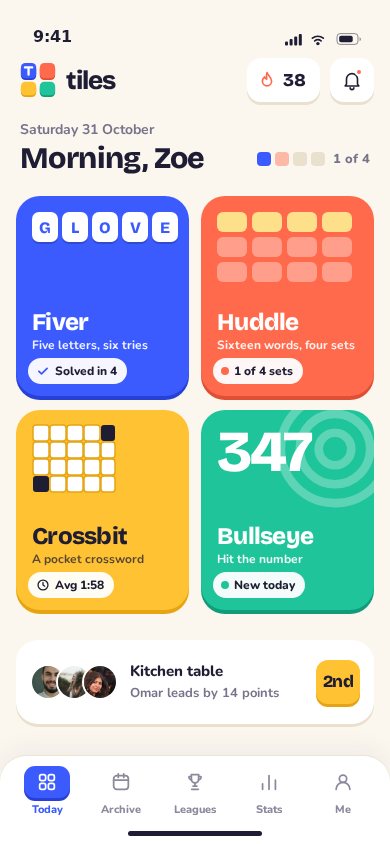
Tiles is a complete daily puzzle app: welcome, picking your daily mix, sign in, a Today hub with four puzzles and your streak, Fiver (a five letter word in six tries) with its keyboard, a solved screen, guess stats and a shareable result card, Huddle (sort sixteen words into four sets) and its solved board, Crossbit (a five by five mini crossword), Bullseye (hit a target number with six tiles) and its how to play, the archive calendar, themed puzzle packs, overall stats, leagues with a daily leaderboard and a new league form, a Plus plan with checkout, notifications, profile and settings.
| Detail | Value |
|---|---|
| Screen type | Home |
| App | Tiles: Daily word and number puzzles |
| Category | Education |
| Design language | Playful, light |
| Type | Bricolage Grotesque for headings, Nunito for text |
| Colours | #fbf7ef background, #ffffff surface, #1f1d33 text, #77738a text-muted, #3b5bff accent, #ffffff accent-contrast, #ff6a4d secondary, #ece4d4 border, #e04f33 danger |
What this screen says
- tiles
- Saturday 31 October
- Morning, Zoe
- 1 of 4
- G L O V E
- Fiver
- Five letters, six tries
- Solved in 4
- Huddle
- Sixteen words, four sets
- 1 of 4 sets
- Crossbit
- A pocket crossword
- Avg 1:58
- Bullseye
- Hit the number
- New today
- Kitchen tableOmar leads by 14 points
- 2nd
- Today
- Archive
- Leagues
- Stats
- Me
Around it in Tiles
More home screens
- Gambit Home: Chess training
- Buzzer Home: Live trivia
- Homeroom Home: School, all on one page
- Parla Home: Language learning
- Recall Home: Flashcards and spaced repetition
- Numo Home: Kids maths game
- Syntax Home: Learn to code
- Tuckin Home: Bedtime stories for kids
- Zenith Tonight: Night sky guide
- Chalk Home: Design courses
- Encore Feed: Creator courses
- Classroom Classes: Class stream and assignments
Every education app home screen
What makes a good home screen
- Put the most important thing first. Decide the one thing most people come for, like today's workout, a balance or the next booking, and give it the top of the screen.
- Make it feel current. Greetings with the time of day, today's date, fresh numbers and recent activity tell people the app is alive and about them.
- Keep quick actions within thumb reach. The two or three things people do most should be one tap away, in the lower part of the screen or a floating button.
- Group related content in clear sections. Use headings and spacing so the screen scans as a few blocks, not a long mixed list.
The full home screen guide and every example
Remix Tiles free: describe your own app and it is drawn in this design. Or get its files from $10: Figma, React Native, SwiftUI, Flutter and HTML.