Templates · Home screens · Education app · Lexis
Lexis Today screen
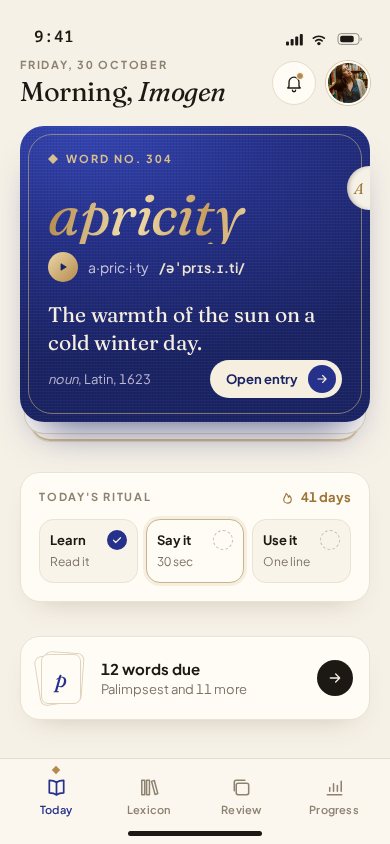
A home screen from Lexis, an education app template in a Luxury style. Screen 4 of 25.
Lexis is a complete word a day app: welcome, interests and sign in, a Today screen with the word of the day as a lapis bookcloth card, the full dictionary entry, a pronunciation coach with your voice against the reference, an etymology lineage, quotations in the wild, a quiz with results, writing your own sentence, spaced review with flashcards, your lexicon with an A to Z thumb index, search, curated collections, adding a word you met, progress, a Patron plan, gifting a year, notifications, profile and settings. Vellum and ivory with lapis bookcloth and gilt.
| Detail | Value |
|---|---|
| Screen type | Home |
| App | Lexis: A word a day |
| Category | Education |
| Design language | Luxury, light |
| Type | Fraunces for headings, Plus Jakarta Sans for text |
| Colours | #f6f1e7 background, #fffcf6 surface, #1c1813 text, #7b7265 text-muted, #25318a accent, #f6efe0 accent-contrast, #b48a4e secondary, #e6dccb border, #b3412f danger |
What this screen says
- Friday, 30 October
- Morning, Imogen
- Word no. 304
- apricity
- a·pric·i·ty /əˈprɪs.ɪ.ti/
- The warmth of the sun on a cold winter day.
- noun, Latin, 1623 Open entry
- Today's ritual 41 days
- Learn Read it
- Say it30 sec
- Use itOne line
- 12 words duePalimpsest and 11 more
- Today
- Lexicon
- Review
- Progress
Around it in Lexis
More home screens
- Cram Home: Exam prep and mock tests
- Quad Today: University campus app
- Palm Home: Learn sign language
- Epoch Today: History on a timeline
- Wren Home: Early reading for kids
- Proof Home: Maths tutor that shows its working
- Skim Today: Speed reading trainer
- Terra Home: Geography and flags quiz
- Gambit Home: Chess training
- Buzzer Home: Live trivia
- Homeroom Home: School, all on one page
- Parla Home: Language learning
Every education app home screen
What makes a good home screen
- Put the most important thing first. Decide the one thing most people come for, like today's workout, a balance or the next booking, and give it the top of the screen.
- Make it feel current. Greetings with the time of day, today's date, fresh numbers and recent activity tell people the app is alive and about them.
- Keep quick actions within thumb reach. The two or three things people do most should be one tap away, in the lower part of the screen or a floating button.
- Group related content in clear sections. Use headings and spacing so the screen scans as a few blocks, not a long mixed list.
The full home screen guide and every example
Remix Lexis free: describe your own app and it is drawn in this design. Or get its files from $10: Figma, React Native, SwiftUI, Flutter and HTML.