Templates · Home screens · Education app · Penpal
Penpal Partners screen
A home screen from Penpal, a language exchange chat app template in a Playful style. Screen 4 of 25.
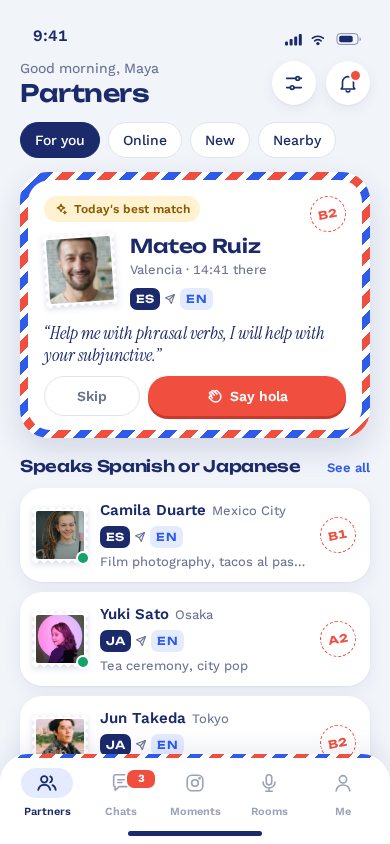
Penpal is a complete language exchange app: welcome, your native and learning languages, sign up, a partners home matched by language, search with filters, a partner profile, chats, a conversation with inline corrections and translations, a correction editor, a translation sheet, voice messages, a call with topic cards, a moments feed with a post, comments and a composer, live voice rooms, progress stats, a saved phrase notebook, a Plus plan with checkout and confirmation, notifications, profile and settings. Airmail paper, postal navy, airmail red and blue.
| Detail | Value |
|---|---|
| Screen type | Home |
| App | Penpal: Language exchange chat |
| Category | Education |
| Design language | Playful, light |
| Type | Unbounded for headings, Work Sans for text |
| Colours | #f1f4f9 background, #ffffff surface, #1b2a6b text, #6b7493 text-muted, #f04e3e accent, #ffffff accent-contrast, #2f5bea secondary, #e0e5ef border, #14a26b success, #ffcf4a highlight |
What this screen says
- Good morning, Maya
- Partners
- For you Online New Nearby
- Today's best match
- Mateo Ruiz
- Valencia · 14:41 there
- ES EN
- B2
- “Help me with phrasal verbs, I will help with your subjunctive.”
- Skip
- Say hola
- Speaks Spanish or Japanese
- See all
- Camila DuarteMexico City
- Film photography, tacos al pastor
- B1
- Yuki SatoOsaka
- JA EN
- Tea ceremony, city pop
- A2
- Jun TakedaTokyo
- Architecture, cycling, ramen maps
- Chats3
- Moments
- Rooms
- Me
Around it in Penpal
More home screens
- Stacks Home: Borrow e-books and audiobooks from your library
- Lexis Today: A word a day
- Quanta Home: Interactive physics lessons
- Cram Home: Exam prep and mock tests
- Quad Today: University campus app
- Palm Home: Learn sign language
- Epoch Today: History on a timeline
- Wren Home: Early reading for kids
- Proof Home: Maths tutor that shows its working
- Skim Today: Speed reading trainer
- Terra Home: Geography and flags quiz
- Gambit Home: Chess training
Every education app home screen
What makes a good home screen
- Put the most important thing first. Decide the one thing most people come for, like today's workout, a balance or the next booking, and give it the top of the screen.
- Make it feel current. Greetings with the time of day, today's date, fresh numbers and recent activity tell people the app is alive and about them.
- Keep quick actions within thumb reach. The two or three things people do most should be one tap away, in the lower part of the screen or a floating button.
- Group related content in clear sections. Use headings and spacing so the screen scans as a few blocks, not a long mixed list.
The full home screen guide and every example
Remix Penpal free: describe your own app and it is drawn in this design. Or get its files from $10: Figma, React Native, SwiftUI, Flutter and HTML.