Templates · Home screens · Education app · Almanac
Almanac Explore screen
A home screen from Almanac, an education app template in a Minimal style. Screen 3 of 25.
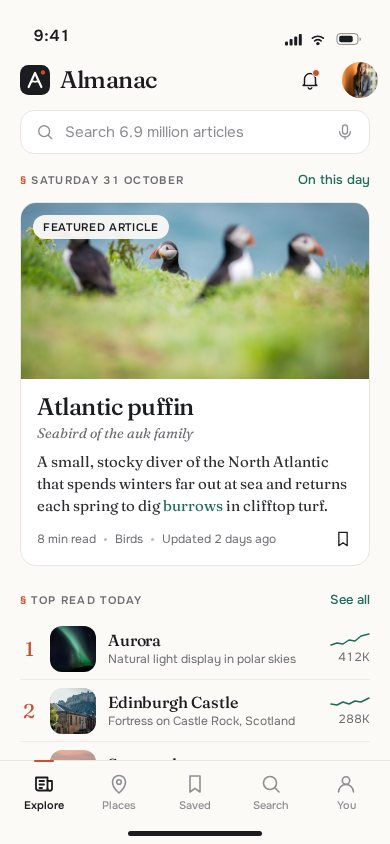
Almanac is a complete encyclopedia reader: welcome, sign in, an explore feed with the featured article, trending reads, on this day and the picture of the day, a full article with contents, quick facts and link previews, search with suggestions and results, saved reading lists, a map of articles nearby, page history, talk threads, section editing, the same article in 74 languages, reading stats, and a supporter plan with a donation, receipt, notifications, profile and settings. Paper white and ink, with viridian links and one vermilion accent.
| Detail | Value |
|---|---|
| Screen type | Home |
| App | Almanac: The free encyclopedia reader |
| Category | Education |
| Design language | Minimal, light |
| Type | Fraunces for headings, Onest for text |
| Colours | #fbfaf6 background, #ffffff surface, #1a1c1f text, #6c6e72 text-muted, #1d6b58 accent, #e3efe9 accent-tint, #c8502f secondary, #f3efe5 parchment, #e8e6df border |
What this screen says
- Almanac
- Search 6.9 million articles
- §Saturday 31 October
- On this day
- Featured article
- Atlantic puffin
- Seabird of the auk family
- A small, stocky diver of the North Atlantic that spends winters far out at sea and returns each spring to dig...
- 8 min read Birds Updated 2 days ago
- §Top read today
- See all
- AuroraNatural light display in polar skies
- 412K
- Edinburgh CastleFortress on Castle Rock, Scotland
- 288K
- StratovolcanoTall cone built of hardened lava layers
- 197K
- Explore
- Places
- Saved
- Search
- You
Around it in Almanac
More home screens
- Lexis Today: A word a day
- Quanta Home: Interactive physics lessons
- Cram Home: Exam prep and mock tests
- Quad Today: University campus app
- Palm Home: Learn sign language
- Epoch Today: History on a timeline
- Wren Home: Early reading for kids
- Proof Home: Maths tutor that shows its working
- Skim Today: Speed reading trainer
- Terra Home: Geography and flags quiz
- Gambit Home: Chess training
- Buzzer Home: Live trivia
Every education app home screen
What makes a good home screen
- Put the most important thing first. Decide the one thing most people come for, like today's workout, a balance or the next booking, and give it the top of the screen.
- Make it feel current. Greetings with the time of day, today's date, fresh numbers and recent activity tell people the app is alive and about them.
- Keep quick actions within thumb reach. The two or three things people do most should be one tap away, in the lower part of the screen or a floating button.
- Group related content in clear sections. Use headings and spacing so the screen scans as a few blocks, not a long mixed list.
The full home screen guide and every example
Remix Almanac free: describe your own app and it is drawn in this design. Or get its files from $10: Figma, React Native, SwiftUI, Flutter and HTML.