Templates · Home screens · Education app · Quanta
Quanta Home screen
A home screen from Quanta, an interactive physics lessons app template in a Dark-first style. Screen 4 of 25.
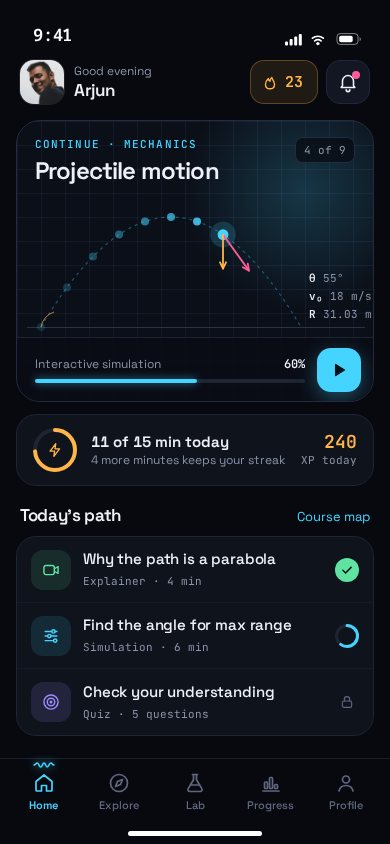
Quanta is a complete physics learning app: welcome, a goal picker and sign in, a home with the lesson in progress, explore by topic, a course map, a lesson page, an interactive projectile simulation with sliders, an animated explainer, a quiz with feedback and a lesson complete screen, a live pendulum lab, a lab notebook and a results form, a formula sheet and formula page, progress stats, live tutor labs with booking and confirmation, a Plus plan, notifications, profile and settings. Ink black and graph paper with photon cyan, amber energy and magenta force.
| Detail | Value |
|---|---|
| Screen type | Home |
| App | Quanta: Interactive physics lessons |
| Category | Education |
| Design language | Dark-first, dark |
| Type | Instrument Serif for headings, Space Grotesk for text |
| Colours | #07090f background, #0f131c surface, #eef1f8 text, #8a93a8 text-muted, #45d4ff accent, #03121a accent-contrast, #ffb547 secondary, #1e2433 border, #ff5c9a danger |
What this screen says
- Good evening
- Arjun
- Continue · Mechanics
- Projectile motion
- 4 of 9
- θ 55°
- v₀ 18 m/s
- R 31.03 m
- Interactive simulation60%
- 11 of 15 min today
- 4 more minutes keeps your streak
- XP today
- Today's path
- Course map
- Why the path is a parabolaExplainer · 4 min
- Find the angle for max rangeSimulation · 6 min
- Check your understandingQuiz · 5 questions
- Home
- Explore
- Lab
- Progress
- Profile
Around it in Quanta
More home screens
- Proof Home: Maths tutor that shows its working
- Skim Today: Speed reading trainer
- Terra Home: Geography and flags quiz
- Gambit Home: Chess training
- Buzzer Home: Live trivia
- Homeroom Home: School, all on one page
- Parla Home: Language learning
- Recall Home: Flashcards and spaced repetition
- Numo Home: Kids maths game
- Syntax Home: Learn to code
- Tuckin Home: Bedtime stories for kids
- Zenith Tonight: Night sky guide
Every education app home screen
What makes a good home screen
- Put the most important thing first. Decide the one thing most people come for, like today's workout, a balance or the next booking, and give it the top of the screen.
- Make it feel current. Greetings with the time of day, today's date, fresh numbers and recent activity tell people the app is alive and about them.
- Keep quick actions within thumb reach. The two or three things people do most should be one tap away, in the lower part of the screen or a floating button.
- Group related content in clear sections. Use headings and spacing so the screen scans as a few blocks, not a long mixed list.
The full home screen guide and every example
Remix Quanta free: describe your own app and it is drawn in this design. Or get its files from $10: Figma, React Native, SwiftUI, Flutter and HTML.