Templates · Home screens · Education app · Stacks
Stacks Home screen
A home screen from Stacks, an education app template in a Playful style. Screen 4 of 25.
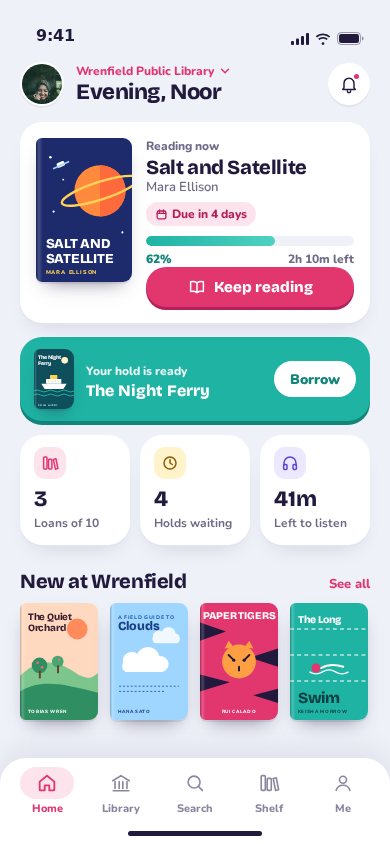
Stacks is a complete library lending app: welcome, finding your library and adding a library card, a home with the book you are reading and a hold that is ready, browsing the collection, search with availability, a title page with copies, borrowing with a lending period and a success screen, placing a hold with an estimated wait and your place in line, loans with renew and return, holds, a reader with highlights and reading options, an audiobook player, tags, a timeline, a reading year dashboard, notifications, a supporter plan, profile with library cards and settings. Cool cloud white with raspberry, teal and butter.
| Detail | Value |
|---|---|
| Screen type | Home |
| App | Stacks: Borrow e-books and audiobooks from your library |
| Category | Education |
| Design language | Playful, light |
| Type | Bricolage Grotesque for headings, Nunito for text |
| Colours | #eef1f8 background, #ffffff surface, #221a3d text, #6f6a86 text-muted, #e2366f accent, #ffffff accent-contrast, #1fb3a3 secondary, #e2e4ef border, #ffd257 warning |
What this screen says
- Wrenfield Public Library
- Evening, Noor
- Reading now
- Salt and Satellite
- Mara Ellison
- Due in 4 days
- 62%2h 10m left
- Keep reading
- Your hold is readyThe Night Ferry
- Borrow
- 3Loans of 10
- 4Holds waiting
- 41mLeft to listen
- New at Wrenfield
- See all
- Home
- Library
- Search
- Shelf
- Me
Around it in Stacks
More home screens
- Studyhall Home: Free lessons and practice for school
- Tutor Home: Book online tutors for any skill
- Leaf Home: E-books and reading
- Almanac Explore: The free encyclopedia reader
- Tiles Today: Daily word and number puzzles
- Penpal Partners: Language exchange chat
- Lexis Today: A word a day
- Quanta Home: Interactive physics lessons
- Cram Home: Exam prep and mock tests
- Quad Today: University campus app
- Palm Home: Learn sign language
- Epoch Today: History on a timeline
Every education app home screen
What makes a good home screen
- Put the most important thing first. Decide the one thing most people come for, like today's workout, a balance or the next booking, and give it the top of the screen.
- Make it feel current. Greetings with the time of day, today's date, fresh numbers and recent activity tell people the app is alive and about them.
- Keep quick actions within thumb reach. The two or three things people do most should be one tap away, in the lower part of the screen or a floating button.
- Group related content in clear sections. Use headings and spacing so the screen scans as a few blocks, not a long mixed list.
The full home screen guide and every example
Remix Stacks free: describe your own app and it is drawn in this design. Or get its files from $10: Figma, React Native, SwiftUI, Flutter and HTML.