Templates · Home screens · Education app · Palm
Palm Home screen
A home screen from Palm, a learn sign language app template in a Playful style. Screen 4 of 25.
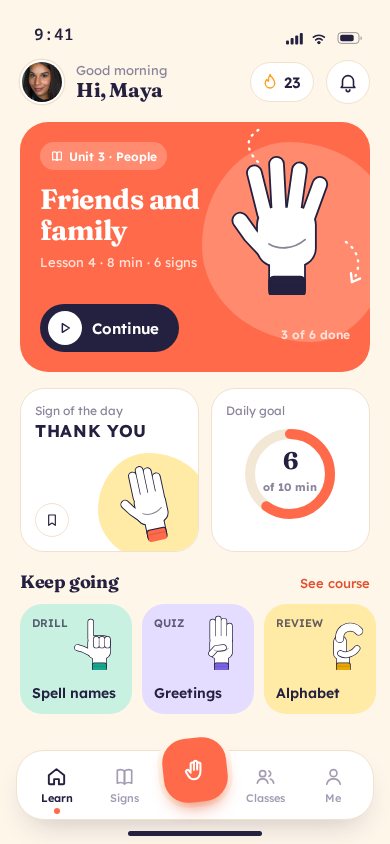
Palm is a complete sign language course: welcome, a learning goal, sign up, a home with today's lesson and the sign of the day, the course and a unit, a slow motion video lesson, a sign broken into handshape, location and movement, camera practice with live hand feedback, a quiz, fingerspelling and the alphabet, a lesson done screen, the sign dictionary, saved signs, progress, live classes with Deaf tutors, booking and a confirmation, a culture read, a Plus plan, notifications, profile and settings. Cream and white with coral, sunflower and pastel pebbles.
| Detail | Value |
|---|---|
| Screen type | Home |
| App | Palm: Learn sign language |
| Category | Education |
| Design language | Playful, light |
| Type | Fraunces for headings, Lexend for text |
| Colours | #fff6ea background, #ffffff surface, #24203f text, #8a8399 text-muted, #ff6b4a accent, #ffffff accent-contrast, #ffc94a secondary, #f0e2cf border, #e2502f danger |
What this screen says
- Good morningHi, Maya
- Unit 3 · People
- Friends and family
- Lesson 4 · 8 min · 6 signs
- Continue
- 3 of 6 done
- Sign of the dayTHANK YOU
- Daily goal
- 6of 10 min
- Keep goingSee course
- DRILL Spell names
- QUIZ Greetings
- REVIEW Alphabet
- Learn
- Signs
- Classes
- Me
Around it in Palm
More home screens
- Numo Home: Kids maths game
- Syntax Home: Learn to code
- Tuckin Home: Bedtime stories for kids
- Zenith Tonight: Night sky guide
- Chalk Home: Design courses
- Encore Feed: Creator courses
- Classroom Classes: Class stream and assignments
- Studyhall Home: Free lessons and practice for school
- Tutor Home: Book online tutors for any skill
- Leaf Home: E-books and reading
- Almanac Explore: The free encyclopedia reader
- Tiles Today: Daily word and number puzzles
Every education app home screen
What makes a good home screen
- Put the most important thing first. Decide the one thing most people come for, like today's workout, a balance or the next booking, and give it the top of the screen.
- Make it feel current. Greetings with the time of day, today's date, fresh numbers and recent activity tell people the app is alive and about them.
- Keep quick actions within thumb reach. The two or three things people do most should be one tap away, in the lower part of the screen or a floating button.
- Group related content in clear sections. Use headings and spacing so the screen scans as a few blocks, not a long mixed list.
The full home screen guide and every example
Remix Palm free: describe your own app and it is drawn in this design. Or get its files from $10: Figma, React Native, SwiftUI, Flutter and HTML.