Templates · Home screens · Education app · Tutor
Tutor Home screen
A home screen from Tutor, an education app template in a Minimal style. Screen 4 of 25.
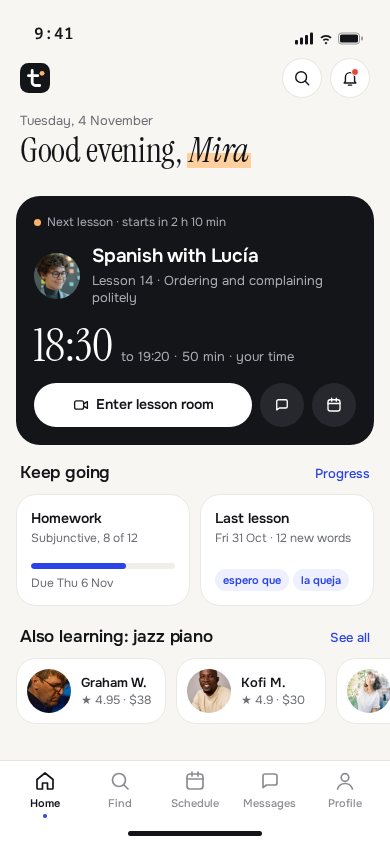
Tutor is a complete tutoring app for adult learners: welcome, picking a subject and level, sign in, a home with the next lesson, search by subject, tutor results with price, rating and an availability grid, filters for price, free times and native speakers, a tutor profile with an intro video, reviews, a time picker, trial booking, checkout and a booked ticket, monthly lesson plans, a schedule, a live video lesson room, shared notes, a lesson summary, homework, progress, messages, a chat, notifications, profile and settings. Paper white and ink with apricot highlights and cobalt.
| Detail | Value |
|---|---|
| Screen type | Home |
| App | Tutor: Book online tutors for any skill |
| Category | Education |
| Design language | Minimal, light |
| Type | Instrument Serif for headings, Onest for text |
| Colours | #f7f6f2 background, #ffffff surface, #141519 text, #6c6e75 text-muted, #141519 accent, #ffffff accent-contrast, #2b44e8 secondary, #ffcf9e highlight, #e7e5df border, #1f9d63 success, #e0483c danger |
What this screen says
- Tuesday, 4 November
- Good evening, Mira
- Next lesson · starts in 2 h 10 min
- Spanish with Lucía
- Lesson 14 · Ordering and complaining politely
- 18:30to 19:20 · 50 min · your time
- Enter lesson room
- Keep going
- Progress
- HomeworkSubjunctive, 8 of 12
- Due Thu 6 Nov
- Last lessonFri 31 Oct · 12 new words
- espero que la queja
- Also learning: jazz piano
- See all
- Graham W.★ 4.95 · $38
- Kofi M.★ 4.9 · $30
- Hana L.★ 4.8 · $26
- Home
- Find
- Schedule
- Messages
- Profile
Around it in Tutor
More home screens
- Tiles Today: Daily word and number puzzles
- Stacks Home: Borrow e-books and audiobooks from your library
- Penpal Partners: Language exchange chat
- Lexis Today: A word a day
- Quanta Home: Interactive physics lessons
- Cram Home: Exam prep and mock tests
- Quad Today: University campus app
- Palm Home: Learn sign language
- Epoch Today: History on a timeline
- Wren Home: Early reading for kids
- Proof Home: Maths tutor that shows its working
- Skim Today: Speed reading trainer
Every education app home screen
What makes a good home screen
- Put the most important thing first. Decide the one thing most people come for, like today's workout, a balance or the next booking, and give it the top of the screen.
- Make it feel current. Greetings with the time of day, today's date, fresh numbers and recent activity tell people the app is alive and about them.
- Keep quick actions within thumb reach. The two or three things people do most should be one tap away, in the lower part of the screen or a floating button.
- Group related content in clear sections. Use headings and spacing so the screen scans as a few blocks, not a long mixed list.
The full home screen guide and every example
Remix Tutor free: describe your own app and it is drawn in this design. Or get its files from $10: Figma, React Native, SwiftUI, Flutter and HTML.