Templates · Search and explore screens · Education app · Tutor
Tutor Find a tutor screen
A search screen from Tutor, an education app template in a Minimal style. Screen 5 of 25.
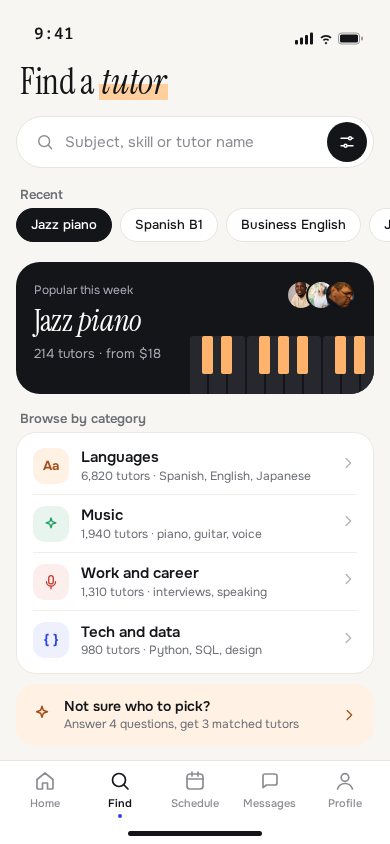
Tutor is a complete tutoring app for adult learners: welcome, picking a subject and level, sign in, a home with the next lesson, search by subject, tutor results with price, rating and an availability grid, filters for price, free times and native speakers, a tutor profile with an intro video, reviews, a time picker, trial booking, checkout and a booked ticket, monthly lesson plans, a schedule, a live video lesson room, shared notes, a lesson summary, homework, progress, messages, a chat, notifications, profile and settings. Paper white and ink with apricot highlights and cobalt.
| Detail | Value |
|---|---|
| Screen type | Search |
| App | Tutor: Book online tutors for any skill |
| Category | Education |
| Design language | Minimal, light |
| Type | Instrument Serif for headings, Onest for text |
| Colours | #f7f6f2 background, #ffffff surface, #141519 text, #6c6e75 text-muted, #141519 accent, #ffffff accent-contrast, #2b44e8 secondary, #ffcf9e highlight, #e7e5df border, #1f9d63 success, #e0483c danger |
What this screen says
- Find a tutor
- Subject, skill or tutor name
- Recent
- Jazz piano Spanish B1 Business English Japanese
- Popular this week
- Jazz piano
- 214 tutors · from $18
- Browse by category
- Aa
- Languages6,820 tutors · Spanish, English, Japanese
- Music1,940 tutors · piano, guitar, voice
- Work and career1,310 tutors · interviews, speaking
- { }
- Tech and data980 tutors · Python, SQL, design
- Not sure who to pick?Answer 4 questions, get 3 matched tutors
- Home
- Find
- Schedule
- Messages
- Profile
Around it in Tutor
More search and explore screens
- Terra Explore: Geography and flags quiz
- Gambit Openings: Chess training
- Buzzer Categories: Live trivia
- Parla Dictionary: Language learning
- Recall Shared decks: Flashcards and spaced repetition
- Numo Practice: Kids maths game
- Syntax Snippets: Learn to code
- Tuckin Search: Bedtime stories for kids
- Zenith Search: Night sky guide
- Chalk Search: Design courses
- Encore Explore: Creator courses
- Studyhall Explore: Free lessons and practice for school
Every education app search screen
What makes a good search screen
- Show something before people type. Recent searches, popular items or categories make the empty search screen useful and save typing.
- Suggest as people type. Autocomplete with matching items, not only matching words, lets people jump straight to a result.
- Make filters visible and reversible. Show active filters as chips that can be removed in one tap, and the number of results as filters change.
- Forgive typos. Close matches and "Did you mean" stop a spelling mistake from ending in an empty screen.
The full search screen guide and every example
Remix Tutor free: describe your own app and it is drawn in this design. Or get its files from $10: Figma, React Native, SwiftUI, Flutter and HTML.