Templates · Home screens · Education app · Skim
Skim Today screen
A home screen from Skim, a speed reading trainer app template in a Minimal style. Screen 5 of 25.
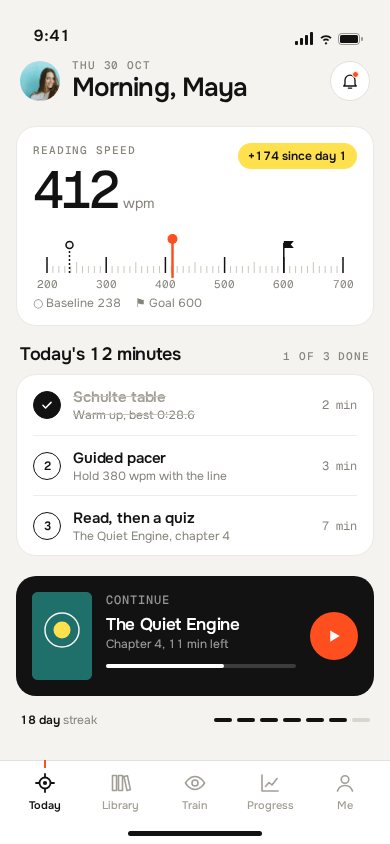
Skim is a complete speed reading trainer: welcome, a baseline reading test, a goal picker and sign up, a today plan, library, discover, a book page, a one word at a time reader, a guided pacer, a comprehension quiz and session results, drills with a live Schulte table, a 21 day course with a lesson, progress and a weekly report, adding your own text, a Pro plan with checkout, notifications, profile and settings. Paper, ink and white with a single vermilion focus letter and a highlighter yellow.
| Detail | Value |
|---|---|
| Screen type | Home |
| App | Skim: Speed reading trainer |
| Category | Education |
| Design language | Minimal, light |
| Type | Geist Mono for headings, Onest for text |
| Colours | #f4f3ef background, #ffffff surface, #121212 text, #86837b text-muted, #ff4f1f accent, #ffffff accent-contrast, #ffe14d secondary, #e3e1da border, #d93a2b danger |
What this screen says
- Thu 30 Oct
- Morning, Maya
- Reading speed
- 412wpm
- +174 since day 1
- ○ Baseline 238 ⚑ Goal 600
- Today's 12 minutes
- 1 of 3 done
- Schulte tableWarm up, best 0:28.6
- 2 min
- Guided pacerHold 380 wpm with the line
- 3 min
- Read, then a quizThe Quiet Engine, chapter 4
- 7 min
- Continue
- The Quiet Engine
- Chapter 4, 11 min left
- 18 day streak
- Today
- Library
- Train
- Progress
- Me
Around it in Skim
More home screens
- Terra Home: Geography and flags quiz
- Gambit Home: Chess training
- Buzzer Home: Live trivia
- Homeroom Home: School, all on one page
- Parla Home: Language learning
- Recall Home: Flashcards and spaced repetition
- Numo Home: Kids maths game
- Syntax Home: Learn to code
- Tuckin Home: Bedtime stories for kids
- Zenith Tonight: Night sky guide
- Chalk Home: Design courses
- Encore Feed: Creator courses
Every education app home screen
What makes a good home screen
- Put the most important thing first. Decide the one thing most people come for, like today's workout, a balance or the next booking, and give it the top of the screen.
- Make it feel current. Greetings with the time of day, today's date, fresh numbers and recent activity tell people the app is alive and about them.
- Keep quick actions within thumb reach. The two or three things people do most should be one tap away, in the lower part of the screen or a floating button.
- Group related content in clear sections. Use headings and spacing so the screen scans as a few blocks, not a long mixed list.
The full home screen guide and every example
Remix Skim free: describe your own app and it is drawn in this design. Or get its files from $10: Figma, React Native, SwiftUI, Flutter and HTML.