Templates · Home screens · Finance app · Zap
Zap Home screen
A home screen from Zap, a pay friends with a note app template in a Playful style. Screen 4 of 25.
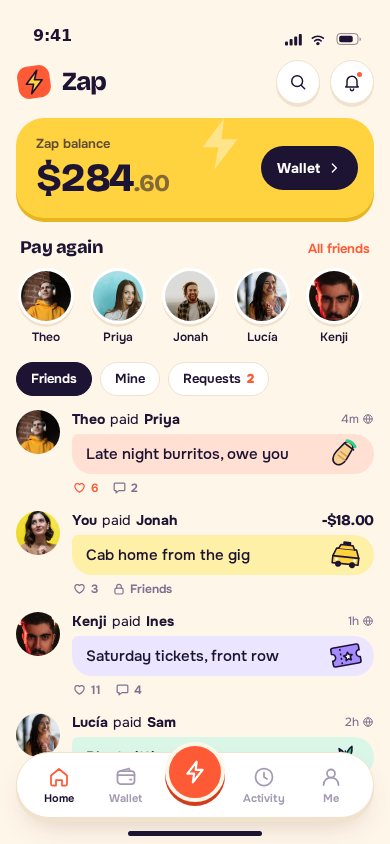
Zap is a complete peer to peer payments app: welcome, phone sign in and code, a friends feed of notes and stickers, a wallet with balance and the Zap card, pay with a number pad, picking a friend, writing a note, review and a sent confetti screen, request, split a bill, a payment with likes and comments, a friend with your history, activity, open requests, scan to pay, the debit card, cash out, monthly insights, a group pot for a trip, a Plus plan, notifications, profile and settings. Warm cream and white with plum ink, tangerine and lemon.
| Detail | Value |
|---|---|
| Screen type | Home |
| App | Zap: Pay friends with a note |
| Category | Finance |
| Design language | Playful, light |
| Type | Bricolage Grotesque for headings, Onest for text |
| Colours | #fff6ea background, #ffffff surface, #1d1433 text, #7d7391 text-muted, #ff5a36 accent, #ffffff accent-contrast, #ffd23f secondary, #f0e2cd border, #e5383b danger |
What this screen says
- Zap
- Zap balance$284.60
- Wallet
- Pay again
- All friends
- Theo
- Priya
- Jonah
- Lucía
- Kenji
- Friends Mine Requests 2
- TheopaidPriya4m
- Late night burritos, owe you
- YoupaidJonah-$18.00
- Cab home from the gig
- 3 Friends
- KenjipaidInes1h
- Saturday tickets, front row
- LucíapaidSam2h
- Plant sitting fee
- Home
- Activity
- Me
Around it in Zap
More home screens
- Standing Home: Credit score and reports
- Accrue Home: Retirement and pension planner
- Levy Home: Taxes for freelancers
- Bullion Home: Gold and silver savings
- Wage Home: Get paid as you work
- Keystone Home: Mortgage and home loan tracker
- Rebate Home: Cashback card and rewards
- Aegis Home: Insurance policies and claims
- Till Today: Card reader and sales for small shops
- Strike Home: Options trading
- Prism Net worth: Net worth across every account
- Folio Portfolio: Stocks and ETF investing
What makes a good home screen
- Put the most important thing first. Decide the one thing most people come for, like today's workout, a balance or the next booking, and give it the top of the screen.
- Make it feel current. Greetings with the time of day, today's date, fresh numbers and recent activity tell people the app is alive and about them.
- Keep quick actions within thumb reach. The two or three things people do most should be one tap away, in the lower part of the screen or a floating button.
- Group related content in clear sections. Use headings and spacing so the screen scans as a few blocks, not a long mixed list.
The full home screen guide and every example
Remix Zap free: describe your own app and it is drawn in this design. Or get its files from $10: Figma, React Native, SwiftUI, Flutter and HTML.