Templates · Home screens · Finance app · Strike
Strike Home screen
A home screen from Strike, an options trading app template in a Dark-first style. Screen 4 of 25.
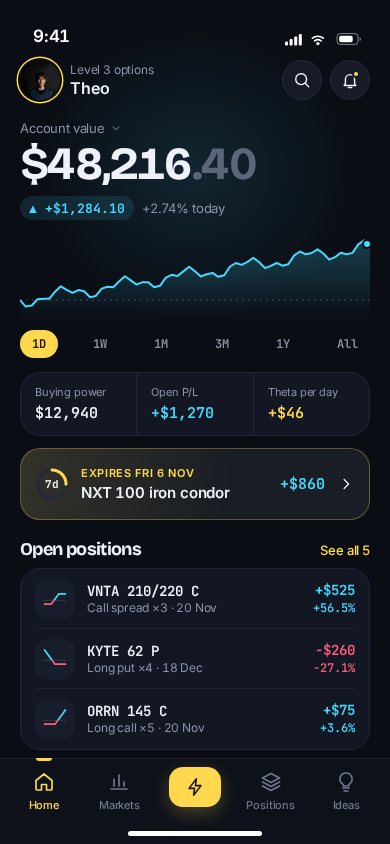
Strike is a complete options trading app: welcome, choosing an options level, sign in, a home with account value and open positions, search, a stock page with IV rank and expected move, an option chain with a strike ladder, a contract with its Greeks, a strategy builder and payoff diagram, an order ticket with review and a fill, positions, a position with a roll, live P/L for an iron condor, strategy ideas, a video lesson, analytics, unusual flow, notifications, a Pro plan, profile and settings. Ink navy with strike yellow, cyan and coral.
| Detail | Value |
|---|---|
| Screen type | Home |
| App | Strike: Options trading |
| Category | Finance |
| Design language | Dark-first, dark |
| Type | Bricolage Grotesque for headings, Inter for text |
| Colours | #0a0d14 background, #121723 surface, #eef1f7 text, #8b93a7 text-muted, #ffd84d accent, #17140a accent-contrast, #46d9ff secondary, #222a3a border, #ff5d7a danger |
What this screen says
- Level 3 options
- Theo
- Account value
- ▲ +$1,284.10+2.74% today
- 1D 1W 1M 3M 1Y All
- Buying power
- Open P/L
- Theta per day
- Expires Fri 6 Nov
- NXT 100 iron condor
- Open positions
- See all 5
- VNTA 210/220 C
- Call spread ×3 · 20 Nov
- KYTE 62 P
- Long put ×4 · 18 Dec
- −$260−27.1%
- ORRN 145 C
- Long call ×5 · 20 Nov
- Home
- Markets
- Positions
- Ideas
Around it in Strike
More home screens
- Giftly Home: Gift cards, sent and stored
- Zap Home: Pay friends with a note
- Billfold Wallet: Cards, passes and tickets wallet
- Payly Home: UPI payments, recharges and bills
- Crest Home: Credit card bills and rewards
- Storefront Home: Run your online store
- Bastion Accounts: Everyday banking from a big bank
- Later Home: Buy now, pay in four
- Standing Home: Credit score and reports
- Accrue Home: Retirement and pension planner
- Levy Home: Taxes for freelancers
- Bullion Home: Gold and silver savings
What makes a good home screen
- Put the most important thing first. Decide the one thing most people come for, like today's workout, a balance or the next booking, and give it the top of the screen.
- Make it feel current. Greetings with the time of day, today's date, fresh numbers and recent activity tell people the app is alive and about them.
- Keep quick actions within thumb reach. The two or three things people do most should be one tap away, in the lower part of the screen or a floating button.
- Group related content in clear sections. Use headings and spacing so the screen scans as a few blocks, not a long mixed list.
The full home screen guide and every example
Remix Strike free: describe your own app and it is drawn in this design. Or get its files from $10: Figma, React Native, SwiftUI, Flutter and HTML.