Templates · Home screens · Finance app · Till
Till Today screen
A home screen from Till, a finance app template in a Neubrutalism style. Screen 4 of 25.
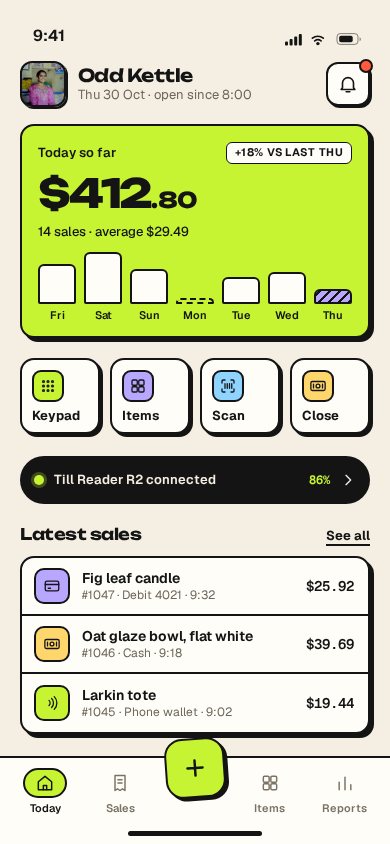
Till is a complete point of sale for a small shop: welcome, pairing the card reader, sign in, a today screen with the week's takings, a charge keypad, an item grid with a cart, a customer tip screen, tap to pay, approved and a printed receipt, sales history, a sale with refund, items, stock and a barcode scanner, reports, payouts, closing the day's cash drawer, notifications, a Plus plan, the shop profile and settings. Receipt paper, ink outlines, acid lime and lilac.
| Detail | Value |
|---|---|
| Screen type | Home |
| App | Till: Card reader and sales for small shops |
| Category | Finance |
| Design language | Neubrutalism, light |
| Type | Unbounded for headings, Geist for text |
| Colours | #f5efe3 background, #fffdf8 surface, #141414 text, #6e675a text-muted, #c6f432 accent, #141414 accent-contrast, #b9a6ff secondary, #141414 border, #ff5b3a danger |
What this screen says
- Odd Kettle
- Thu 30 Oct · open since 8:00
- Today so far +18% vs last Thu
- 14 sales · average $29.49
- Fri
- Sat
- Sun
- Mon
- Tue
- Wed
- Thu
- Keypad
- Items
- Scan
- Close
- Till Reader R2 connected86%
- Latest sales
- See all
- Fig leaf candle
- #1047 · Debit 4021 · 9:32
- Oat glaze bowl, flat white
- #1046 · Cash · 9:18
- Larkin tote
- #1045 · Phone wallet · 9:02
- Today
- Sales
- Reports
Around it in Till
More home screens
- Keystone Home: Mortgage and home loan tracker
- Rebate Home: Cashback card and rewards
- Aegis Home: Insurance policies and claims
- Strike Home: Options trading
- Prism Net worth: Net worth across every account
- Folio Portfolio: Stocks and ETF investing
- Compound Home: Mutual funds and SIPs
- Halden Home: Premium neobank
- Billable Home: Time tracking and invoices, kept like a ledger
- Lease Home: Your tenancy, drawn to plan
- Claim Home: Expenses, filed like a till receipt
- Tally Home: Monthly budgeting
What makes a good home screen
- Put the most important thing first. Decide the one thing most people come for, like today's workout, a balance or the next booking, and give it the top of the screen.
- Make it feel current. Greetings with the time of day, today's date, fresh numbers and recent activity tell people the app is alive and about them.
- Keep quick actions within thumb reach. The two or three things people do most should be one tap away, in the lower part of the screen or a floating button.
- Group related content in clear sections. Use headings and spacing so the screen scans as a few blocks, not a long mixed list.
The full home screen guide and every example
Remix Till free: describe your own app and it is drawn in this design. Or get its files from $10: Figma, React Native, SwiftUI, Flutter and HTML.