Templates · Home screens · Finance app · Folio
Folio Portfolio screen
A home screen from Folio, a stocks and ETF investing app template in a Minimal style. Screen 5 of 25.
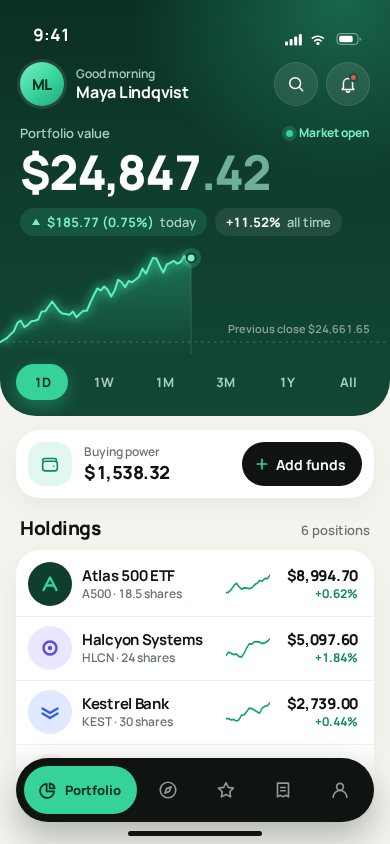
Folio is a complete investing app: welcome, sign in, identity check, funding, a portfolio home with a touchable day chart and holdings, stock and ETF pages, a candle chart, a number pad order ticket with review and confirmation, watchlist, discover with movers, sectors and themes, search, positions, orders, recurring buys, an earnings calendar, news, price alerts, transfers, statements and tax, a premium plan, account and settings. Bone and white with deep forest green, glowing mint and a coral for losses.
| Detail | Value |
|---|---|
| Screen type | Home |
| App | Folio: Stocks and ETF investing |
| Category | Finance |
| Design language | Minimal, light |
| Type | Manrope |
| Colours | #f3f4ee background, #ffffff surface, #0f1412 text, #6b756f text-muted, #35d39a accent, #0a2e22 accent-contrast, #0f3d2e secondary, #e6e8de border, #f0563f danger |
What this screen says
- ML
- Good morning
- Maya Lindqvist
- Portfolio value Market open
- $185.77 (0.75%)today +11.52%all time
- Previous close $24,661.65
- 1D 1W 1M 3M 1Y All
- Buying power
- Add funds
- Holdings
- 6 positions
- Atlas 500 ETF
- A500 · 18.5 shares
- Halcyon Systems
- HLCN · 24 shares
- Kestrel Bank
- KEST · 30 shares
- Northwind Motors
- NWM · 40 shares
- Portfolio
Around it in Folio
More home screens
- Standing Home: Credit score and reports
- Accrue Home: Retirement and pension planner
- Levy Home: Taxes for freelancers
- Bullion Home: Gold and silver savings
- Wage Home: Get paid as you work
- Keystone Home: Mortgage and home loan tracker
- Rebate Home: Cashback card and rewards
- Aegis Home: Insurance policies and claims
- Till Today: Card reader and sales for small shops
- Strike Home: Options trading
- Prism Net worth: Net worth across every account
- Compound Home: Mutual funds and SIPs
What makes a good home screen
- Put the most important thing first. Decide the one thing most people come for, like today's workout, a balance or the next booking, and give it the top of the screen.
- Make it feel current. Greetings with the time of day, today's date, fresh numbers and recent activity tell people the app is alive and about them.
- Keep quick actions within thumb reach. The two or three things people do most should be one tap away, in the lower part of the screen or a floating button.
- Group related content in clear sections. Use headings and spacing so the screen scans as a few blocks, not a long mixed list.
The full home screen guide and every example
Remix Folio free: describe your own app and it is drawn in this design. Or get its files from $10: Figma, React Native, SwiftUI, Flutter and HTML.