Templates · Home screens · Finance app · Wage
Wage Home screen
A home screen from Wage, a finance app template in a Playful style. Screen 5 of 25.
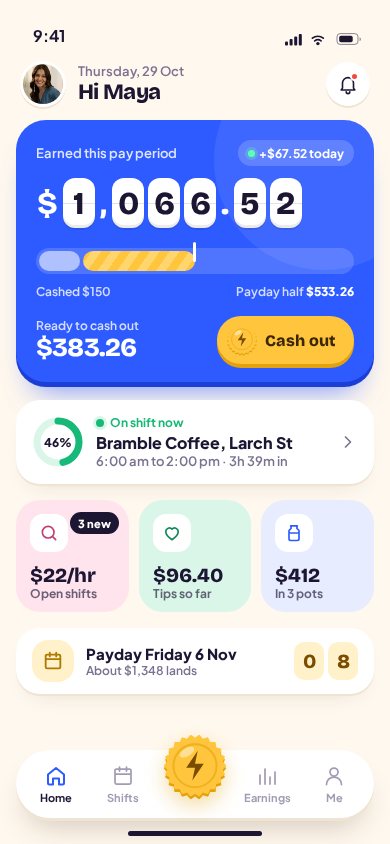
Wage is a complete earned wage access app for shift workers: welcome, employer search, sign in and a text code, a home with pay earned so far on an odometer counter, QR clock in, a live shift dial that earns by the minute, the week of shifts, a shift breakdown, open shifts to pick up with bonus pay, cash out with a number pad, instant or free review and a coin burst success, earnings by day, a payslip, tips, savings pots and a new pot, activity, the Wage debit card, notifications, a Wage Plus plan, profile and settings. Cream and white with electric cobalt, coin gold, mint and bubblegum pink.
| Detail | Value |
|---|---|
| Screen type | Home |
| App | Wage: Get paid as you work |
| Category | Finance |
| Design language | Playful, light |
| Type | Bricolage Grotesque for headings, Plus Jakarta Sans for text |
| Colours | #fff8ee background, #ffffff surface, #1c1633 text, #7a7290 text-muted, #2e5bff accent, #ffffff accent-contrast, #ffc53d secondary, #efe4d3 border, #f2483d danger |
What this screen says
- Thursday, 29 Oct
- Hi Maya
- Earned this pay period +$67.52 today
- Cashed $150 Payday half $533.26
- Ready to cash out
- Cash out
- On shift nowBramble Coffee, Larch St
- 6:00 am to 2:00 pm · 3h 39m in
- 3 new $22/hr
- Open shifts
- Tips so far
- In 3 pots
- Payday Friday 6 Nov
- About $1,348 lands
- Home
- Shifts
- Earnings
- Me
Around it in Wage
More home screens
- Ticker Home: Stock investing
- Burrow Home: Shared savings pots
- Remit Home: International money transfer
- Piggy Home: Pocket money for kids
- Settle Home: Bill payments and banking
- Fathom Home: Crypto wallet
- Marigold Home: Mobile banking
- Zentra Home: Crypto trading
- Payday Home: Payroll for small teams
- Roundup Home: Invest your spare change
- Envelope Budget: Give every dollar a job
- Recur Home: Track and cancel subscriptions
What makes a good home screen
- Put the most important thing first. Decide the one thing most people come for, like today's workout, a balance or the next booking, and give it the top of the screen.
- Make it feel current. Greetings with the time of day, today's date, fresh numbers and recent activity tell people the app is alive and about them.
- Keep quick actions within thumb reach. The two or three things people do most should be one tap away, in the lower part of the screen or a floating button.
- Group related content in clear sections. Use headings and spacing so the screen scans as a few blocks, not a long mixed list.
The full home screen guide and every example
Remix Wage free: describe your own app and it is drawn in this design. Or get its files from $10: Figma, React Native, SwiftUI, Flutter and HTML.