Templates · Home screens · Finance app · Rebate
Rebate Home screen
A home screen from Rebate, a cashback card and rewards app template in a Gen Z style. Screen 5 of 25.
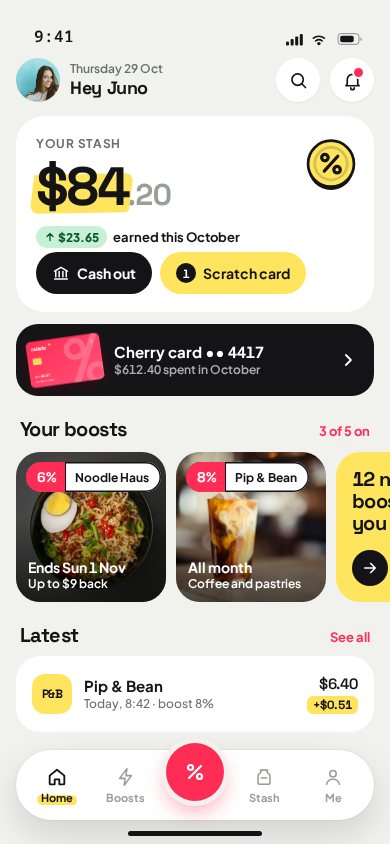
Rebate is a complete cashback card app: welcome, how it works, pick your card, a text code, a home with your stash and live boosts, the card with freeze and limits, activity, a purchase with its cashback split, boosts to browse and switch on, search, a map of boosts nearby, a stash dashboard, cash out with review and success, quests with a live progress map, a scratch card, receipt scanning, invites, notifications, a Plus plan, profile and settings. Off white and white with cherry, butter yellow and ink.
| Detail | Value |
|---|---|
| Screen type | Home |
| App | Rebate: Cashback card and rewards |
| Category | Finance |
| Design language | Gen Z, light |
| Type | Space Grotesk for headings, Plus Jakarta Sans for text |
| Colours | #f1f2ee background, #ffffff surface, #141416 text, #6c706d text-muted, #ff2d55 accent, #ffffff accent-contrast, #ffe45e secondary, #e3e4df border, #e0173f danger |
What this screen says
- Thursday 29 Oct
- Hey Juno
- Your stash
- $23.65earned this October
- Cash out 1Scratch card
- Cherry card •• 4417
- $612.40 spent in October
- Your boosts
- 3 of 5 on
- 6%Noodle Haus
- Ends Sun 1 NovUp to $9 back
- 8%Pip & Bean
- All monthCoffee and pastries
- 12 new boosts near you
- Latest
- See all
- P&B
- Pip & Bean
- Today, 8:42 · boost 8%
- Home
- Boosts
- Stash
- Me
Around it in Rebate
More home screens
- Keel Home: Corporate cards and spend controls
- Giftly Home: Gift cards, sent and stored
- Zap Home: Pay friends with a note
- Billfold Wallet: Cards, passes and tickets wallet
- Payly Home: UPI payments, recharges and bills
- Crest Home: Credit card bills and rewards
- Storefront Home: Run your online store
- Bastion Accounts: Everyday banking from a big bank
- Later Home: Buy now, pay in four
- Standing Home: Credit score and reports
- Accrue Home: Retirement and pension planner
- Levy Home: Taxes for freelancers
What makes a good home screen
- Put the most important thing first. Decide the one thing most people come for, like today's workout, a balance or the next booking, and give it the top of the screen.
- Make it feel current. Greetings with the time of day, today's date, fresh numbers and recent activity tell people the app is alive and about them.
- Keep quick actions within thumb reach. The two or three things people do most should be one tap away, in the lower part of the screen or a floating button.
- Group related content in clear sections. Use headings and spacing so the screen scans as a few blocks, not a long mixed list.
The full home screen guide and every example
Remix Rebate free: describe your own app and it is drawn in this design. Or get its files from $10: Figma, React Native, SwiftUI, Flutter and HTML.