Templates · Home screens · Finance app · Aegis
Aegis Home screen
A home screen from Aegis, an insurance policies and claims app template in a Clinical style. Screen 4 of 25.
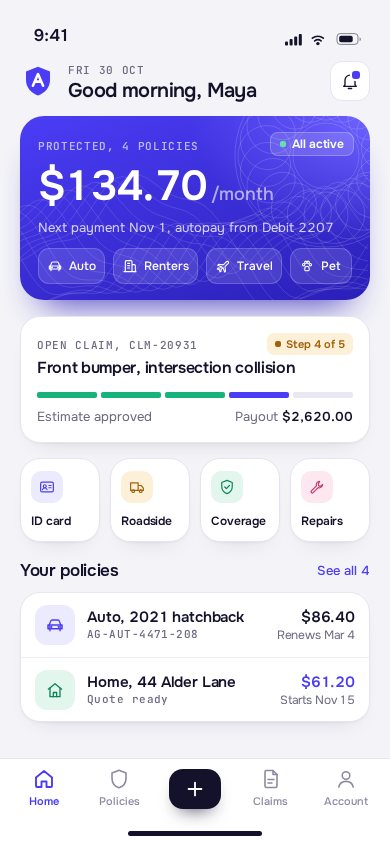
Aegis is a complete insurance app: welcome, sign in and a one time code, a home with every policy and the open claim, policies, an auto policy with limits and deductibles, a digital ID card, an Am I covered search, claims, a guided claim flow (what happened, incident details, damage photos, review, filed), a live claim tracker, roadside help with a tow truck on the map, repair shops, a home quote with checkout, billing, insights, an Aegis Plus plan, notifications, account and settings. Lavender white and white with deep indigo, ink, green for covered and amber for in review.
| Detail | Value |
|---|---|
| Screen type | Home |
| App | Aegis: Insurance policies and claims |
| Category | Finance |
| Design language | Clinical, light |
| Type | JetBrains Mono for headings, Onest for text |
| Colours | #f4f4f8 background, #ffffff surface, #14122b text, #6b6a80 text-muted, #4b3df5 accent, #ffffff accent-contrast, #0b8556 secondary, #e6e5ef border, #c93035 danger |
What this screen says
- Fri 30 Oct
- Good morning, Maya
- Protected, 4 policies
- All active
- $134.70 /month
- Next payment Nov 1, autopay from Debit 2207
- Auto
- Renters
- Travel
- Pet
- Open claim, CLM-20931
- Step 4 of 5
- Front bumper, intersection collision
- Estimate approved Payout $2,620.00
- ID card
- Roadside
- Coverage
- Repairs
- Your policiesSee all 4
- Auto, 2021 hatchbackAG-AUT-4471-208
- $86.40Renews Mar 4
- Home, 44 Alder LaneQuote ready
- $61.20Starts Nov 15
- Home
- Policies
- Claims
- Account
Around it in Aegis
More home screens
- Compound Home: Mutual funds and SIPs
- Halden Home: Premium neobank
- Billable Home: Time tracking and invoices, kept like a ledger
- Lease Home: Your tenancy, drawn to plan
- Claim Home: Expenses, filed like a till receipt
- Tally Home: Monthly budgeting
- Divvy Home: Split bills with friends
- Ticker Home: Stock investing
- Burrow Home: Shared savings pots
- Remit Home: International money transfer
- Piggy Home: Pocket money for kids
- Settle Home: Bill payments and banking
What makes a good home screen
- Put the most important thing first. Decide the one thing most people come for, like today's workout, a balance or the next booking, and give it the top of the screen.
- Make it feel current. Greetings with the time of day, today's date, fresh numbers and recent activity tell people the app is alive and about them.
- Keep quick actions within thumb reach. The two or three things people do most should be one tap away, in the lower part of the screen or a floating button.
- Group related content in clear sections. Use headings and spacing so the screen scans as a few blocks, not a long mixed list.
The full home screen guide and every example
Remix Aegis free: describe your own app and it is drawn in this design. Or get its files from $10: Figma, React Native, SwiftUI, Flutter and HTML.