Templates · Home screens · Finance app · Standing
Standing Home screen
A home screen from Standing, a credit score and reports app template in a Minimal style. Screen 4 of 25.
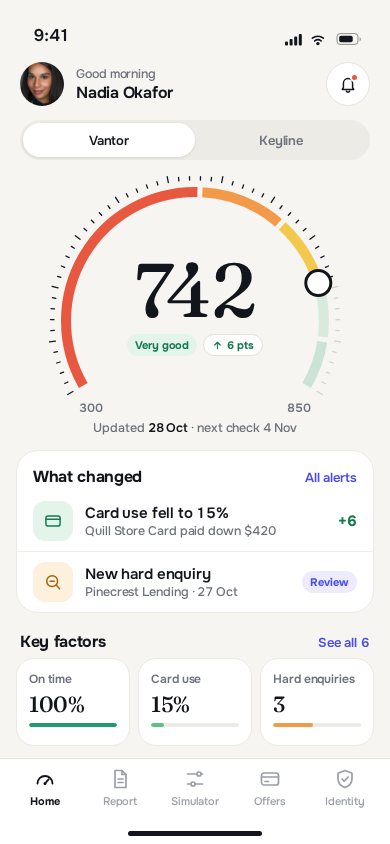
Standing is a complete credit score app: welcome, sign up and identity check, a home with the score dial and what changed, score history across two bureaus, the six score factors with card use and payment history in depth, the full report with accounts, an account page and enquiries, a dispute with confirmation, alerts with a was this you check, a score simulator, identity monitoring with a breach, matched card and loan offers clearly marked as offers with an application and a sent screen, a Plus plan, profile and settings. Paper and white with ink and a coral to green score scale.
| Detail | Value |
|---|---|
| Screen type | Home |
| App | Standing: Credit score and reports |
| Category | Finance |
| Design language | Minimal, light |
| Type | Fraunces for headings, Onest for text |
| Colours | #f6f5f1 background, #ffffff surface, #12151c text, #6d717b text-muted, #12151c accent, #ffffff accent-contrast, #4a4cf0 secondary, #e7e5de border, #d9442e danger |
What this screen says
- Good morning
- Nadia Okafor
- Vantor Keyline
- Very good 6 pts
- Updated 28 Oct · next check 4 Nov
- What changed
- All alerts
- Card use fell to 15%
- Quill Store Card paid down $420
- New hard enquiry
- Pinecrest Lending · 27 Oct
- Review
- Key factors
- See all 6
- On time
- Card use
- Hard enquiries
- Home
- Report
- Simulator
- Offers
- Identity
Around it in Standing
More home screens
- Piggy Home: Pocket money for kids
- Settle Home: Bill payments and banking
- Fathom Home: Crypto wallet
- Marigold Home: Mobile banking
- Zentra Home: Crypto trading
- Payday Home: Payroll for small teams
- Roundup Home: Invest your spare change
- Envelope Budget: Give every dollar a job
- Recur Home: Track and cancel subscriptions
- Keel Home: Corporate cards and spend controls
- Giftly Home: Gift cards, sent and stored
- Zap Home: Pay friends with a note
What makes a good home screen
- Put the most important thing first. Decide the one thing most people come for, like today's workout, a balance or the next booking, and give it the top of the screen.
- Make it feel current. Greetings with the time of day, today's date, fresh numbers and recent activity tell people the app is alive and about them.
- Keep quick actions within thumb reach. The two or three things people do most should be one tap away, in the lower part of the screen or a floating button.
- Group related content in clear sections. Use headings and spacing so the screen scans as a few blocks, not a long mixed list.
The full home screen guide and every example
Remix Standing free: describe your own app and it is drawn in this design. Or get its files from $10: Figma, React Native, SwiftUI, Flutter and HTML.