Templates · Home screens · Finance app · Accrue
Accrue Home screen
A home screen from Accrue, a retirement and pension planner app template in a Minimal style. Screen 4 of 25.
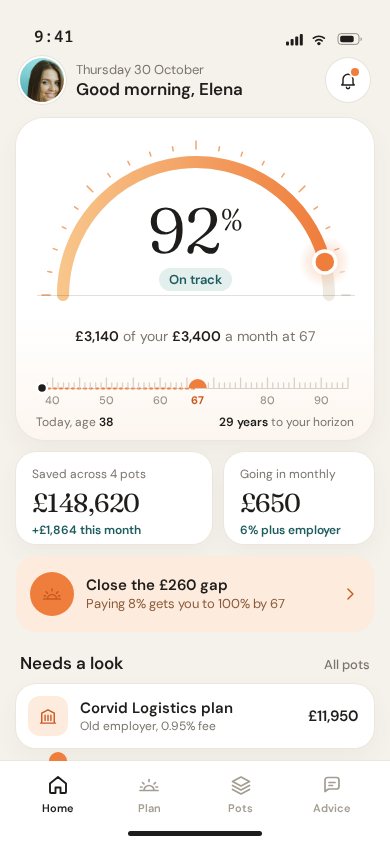
Accrue is a complete retirement planner: welcome, choosing a retirement age, sign in, a home with a setting sun readiness gauge, a projection fan chart to age 95, pots, a pension in full, finding and transferring an old pension with a live tracker, contributions, what if scenarios, an income plan, the state pension record, funds and a target date fund, lifestyle targets, booking and joining an adviser call, activity, notifications, a Plus plan, profile and settings. Linen and white with ink, apricot and dusk teal.
| Detail | Value |
|---|---|
| Screen type | Home |
| App | Accrue: Retirement and pension planner |
| Category | Finance |
| Design language | Minimal, light |
| Type | Fraunces for headings, DM Sans for text |
| Colours | #f5f2ec background, #ffffff surface, #1e1d1b text, #7a756c text-muted, #ef7d3c accent, #ffffff accent-contrast, #1f5c5e secondary, #e8e3da border, #d0453a danger |
What this screen says
- Thursday 30 October
- Good morning, Elena
- 92%On track
- £3,140 of your £3,400 a month at 67
- Today, age 38 29 years to your horizon
- Saved across 4 pots
- £148,620+£1,864 this month
- Going in monthly
- £6506% plus employer
- Close the £260 gap
- Paying 8% gets you to 100% by 67
- Needs a look
- All pots
- Corvid Logistics plan
- Old employer, 0.95% fee
- Home
- Plan
- Pots
- Advice
Around it in Accrue
More home screens
- Tally Home: Monthly budgeting
- Divvy Home: Split bills with friends
- Ticker Home: Stock investing
- Burrow Home: Shared savings pots
- Remit Home: International money transfer
- Piggy Home: Pocket money for kids
- Settle Home: Bill payments and banking
- Fathom Home: Crypto wallet
- Marigold Home: Mobile banking
- Zentra Home: Crypto trading
- Payday Home: Payroll for small teams
- Roundup Home: Invest your spare change
What makes a good home screen
- Put the most important thing first. Decide the one thing most people come for, like today's workout, a balance or the next booking, and give it the top of the screen.
- Make it feel current. Greetings with the time of day, today's date, fresh numbers and recent activity tell people the app is alive and about them.
- Keep quick actions within thumb reach. The two or three things people do most should be one tap away, in the lower part of the screen or a floating button.
- Group related content in clear sections. Use headings and spacing so the screen scans as a few blocks, not a long mixed list.
The full home screen guide and every example
Remix Accrue free: describe your own app and it is drawn in this design. Or get its files from $10: Figma, React Native, SwiftUI, Flutter and HTML.