Templates · Home screens · Finance app · Keystone
Keystone Home screen
A home screen from Keystone, a mortgage and home loan tracker app template in an Enterprise style. Screen 4 of 25.
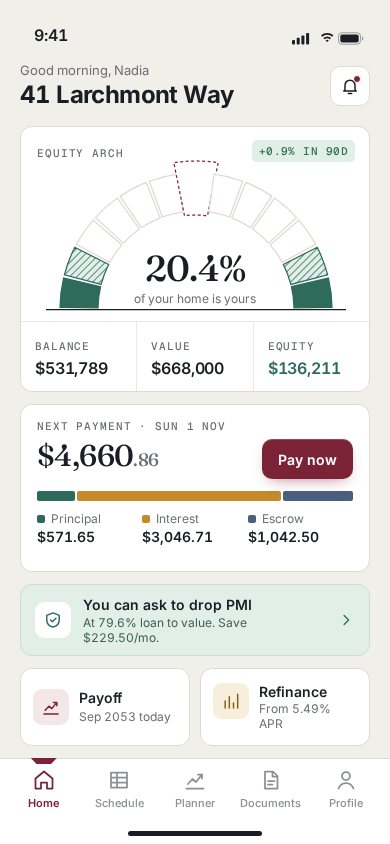
Keystone is a complete home loan tracker: welcome, sign in and linking a lender, a home with the equity arch and the next payment, loan details, the full amortization schedule, a payment breakdown and history, making a payment with extra principal, review and confirmation, a payoff planner, refinance offers with a break-even chart, a live rate lock, home value, property, escrow, equity and PMI removal, documents and a statement viewer, a Pro plan, notifications, profile and settings. Limestone and white with oxblood, verdigris and ochre.
| Detail | Value |
|---|---|
| Screen type | Home |
| App | Keystone: Mortgage and home loan tracker |
| Category | Finance |
| Design language | Enterprise, light |
| Type | Fraunces for headings, Inter for text |
| Colours | #f1efe9 background, #ffffff surface, #1a1d24 text, #6c6e76 text-muted, #7a2236 accent, #ffffff accent-contrast, #2e6b5b secondary, #dfdbd1 border, #b4361f danger |
What this screen says
- Good morning, Nadia
- 41 Larchmont Way
- Equity arch
- +0.9% IN 90D
- 20.4%of your home is yours
- Balance $531,789
- Value $668,000
- Equity $136,211
- Next payment · Sun 1 Nov
- Pay now
- Principal$571.65 Interest$3,046.71 Escrow$1,042.50
- You can ask to drop PMI
- At 79.6% loan to value. Save $229.50/mo.
- Payoff
- Sep 2053 today
- Refinance
- From 5.49% APR
- Home
- Schedule
- Planner
- Documents
- Profile
Around it in Keystone
More home screens
- Compound Home: Mutual funds and SIPs
- Halden Home: Premium neobank
- Billable Home: Time tracking and invoices, kept like a ledger
- Lease Home: Your tenancy, drawn to plan
- Claim Home: Expenses, filed like a till receipt
- Tally Home: Monthly budgeting
- Divvy Home: Split bills with friends
- Ticker Home: Stock investing
- Burrow Home: Shared savings pots
- Remit Home: International money transfer
- Piggy Home: Pocket money for kids
- Settle Home: Bill payments and banking
What makes a good home screen
- Put the most important thing first. Decide the one thing most people come for, like today's workout, a balance or the next booking, and give it the top of the screen.
- Make it feel current. Greetings with the time of day, today's date, fresh numbers and recent activity tell people the app is alive and about them.
- Keep quick actions within thumb reach. The two or three things people do most should be one tap away, in the lower part of the screen or a floating button.
- Group related content in clear sections. Use headings and spacing so the screen scans as a few blocks, not a long mixed list.
The full home screen guide and every example
Remix Keystone free: describe your own app and it is drawn in this design. Or get its files from $10: Figma, React Native, SwiftUI, Flutter and HTML.