Templates · Home screens · Productivity app · Tunnel
Tunnel Home screen
A home screen from Tunnel, a VPN and online privacy app template in a Dark-first style. Screen 4 of 25.
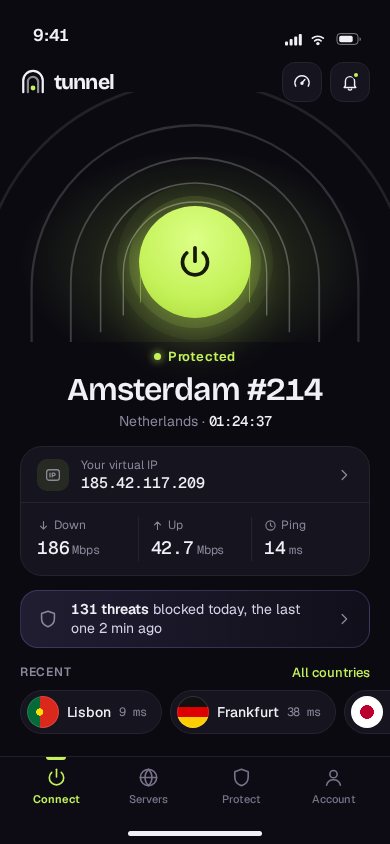
Tunnel is a complete VPN and privacy app: welcome, sign in and VPN permission, a one tap connect home inside a glowing tunnel, the connecting handshake, a dot matrix server map, a country list and a country with its cities, live connection details, specialty servers and double hop, protocols, kill switch, split tunnelling, threat protection with a blocked log, a data breach monitor and a leak, a speed test, plans, checkout and a success screen, notifications, account and settings. Aubergine black and plum graphite with signal lime and lavender.
| Detail | Value |
|---|---|
| Screen type | Home |
| App | Tunnel: VPN and online privacy |
| Category | Productivity |
| Design language | Dark-first, dark |
| Type | Bricolage Grotesque for headings, Geist for text |
| Colours | #0b0a11 background, #16141e surface, #f2f0f7 text, #8d879b text-muted, #c5f25a accent, #141a05 accent-contrast, #a796ff secondary, #26222f border, #ff6b5b danger |
What this screen says
- tunnel
- Protected
- Amsterdam #214
- Netherlands · 01:24:37
- Your virtual IP 185.42.117.209
- Down 186Mbps
- Up 42.7Mbps
- Ping 14ms
- 131 threats blocked today, the last one 2 min ago
- Recent
- All countries
- Lisbon 9 ms
- Frankfurt 38 ms
- Tokyo
- Connect
- Servers
- Protect
- Account
Around it in Tunnel
More home screens
- Tandem Home: Team chat, channels and huddles
- Shipyard Home: Issue tracking for product teams
- Canvas Recents: Design files and comments on mobile
- Merge Home: Code, pull requests and reviews
- Query Home: AI answers with sources
- Glossa Translate: Translate text, voice and camera
- Layout Home: Design anything from templates
- Tick Today: To-do lists and reminders
- Beacon People: Find your devices and people
- Staffroom Home: HR, payslips and time off
- Slot Home: Booking links and meeting scheduling
- Sheet Home: Spreadsheets and databases
Every productivity app home screen
What makes a good home screen
- Put the most important thing first. Decide the one thing most people come for, like today's workout, a balance or the next booking, and give it the top of the screen.
- Make it feel current. Greetings with the time of day, today's date, fresh numbers and recent activity tell people the app is alive and about them.
- Keep quick actions within thumb reach. The two or three things people do most should be one tap away, in the lower part of the screen or a floating button.
- Group related content in clear sections. Use headings and spacing so the screen scans as a few blocks, not a long mixed list.
The full home screen guide and every example
Remix Tunnel free: describe your own app and it is drawn in this design. Or get its files from $10: Figma, React Native, SwiftUI, Flutter and HTML.