Templates · Home screens · Productivity app · Shipyard
Shipyard Home screen
A home screen from Shipyard, an issue tracking for product teams app template in a Dark-first style. Screen 4 of 25.
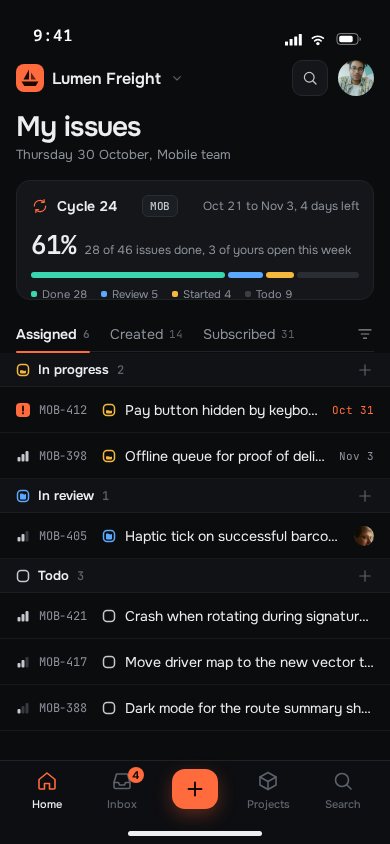
Shipyard is a complete issue tracker for product teams: welcome, sign in and joining a workspace, a home with your issues and the running cycle, an inbox, team issues as a grouped list and a board, an issue with properties, sub-issues and a comment thread, a quick new issue sheet with a status picker, search and filters, a cycle burn-up with a closing summary, projects, a project page, a roadmap timeline, insights, a triage queue, a screenshot attachment viewer, plans with a seat checkout, a teammate profile and settings. Graphite and charcoal with buoy orange and seafoam.
| Detail | Value |
|---|---|
| Screen type | Home |
| App | Shipyard: Issue tracking for product teams |
| Category | Productivity |
| Design language | Dark-first, dark |
| Type | JetBrains Mono for headings, Onest for text |
| Colours | #0b0c0e background, #141619 surface, #eceef0 text, #8b929b text-muted, #ff6b3d accent, #1a0a03 accent-contrast, #3ad6b0 secondary, #24282d border, #ff5f6d danger |
What this screen says
- Lumen Freight
- My issues
- Thursday 30 October, Mobile team
- Cycle 24MOB Oct 21 to Nov 3, 4 days left
- 61%28 of 46 issues done, 3 of yours open this week
- Done 28 Review 5 Started 4 Todo 9
- Assigned6 Created14 Subscribed31
- In progress2
- MOB-412
- Pay button hidden by keyboard on small phones
- Oct 31
- MOB-398
- Offline queue for proof of delivery photos
- Nov 3
- In review1
- MOB-405
- Haptic tick on successful barcode scan
- Todo3
- MOB-421
- Crash when rotating during signature capture
- MOB-417
- Move driver map to the new vector tiles
- MOB-388
- Dark mode for the route summary sheet
- Home
- Inbox4
- Projects
- Search
Around it in Shipyard
More home screens
- Meridian Start page: Mobile web browser
- Swarm Transfers: Torrent client
- Bench Home: Freelance marketplace
- Convene Home: Video meetings
- Unplug Home: Screen time blocker
- Streak Today: Small days, long chains
- Deskly Home: Hybrid office booking
- Pomo Home: Focus timer
- Postbox Inbox: Email for busy teams
- Daybook Today: Calendar and planner
- Scanly Home: Document scanner
- Keyring Vault: Password manager
Every productivity app home screen
What makes a good home screen
- Put the most important thing first. Decide the one thing most people come for, like today's workout, a balance or the next booking, and give it the top of the screen.
- Make it feel current. Greetings with the time of day, today's date, fresh numbers and recent activity tell people the app is alive and about them.
- Keep quick actions within thumb reach. The two or three things people do most should be one tap away, in the lower part of the screen or a floating button.
- Group related content in clear sections. Use headings and spacing so the screen scans as a few blocks, not a long mixed list.
The full home screen guide and every example
Remix Shipyard free: describe your own app and it is drawn in this design. Or get its files from $10: Figma, React Native, SwiftUI, Flutter and HTML.