Templates · Home screens · Productivity app · Query
Query Home screen
A home screen from Query, an AI answers with sources app template in a Minimal style. Screen 4 of 25.
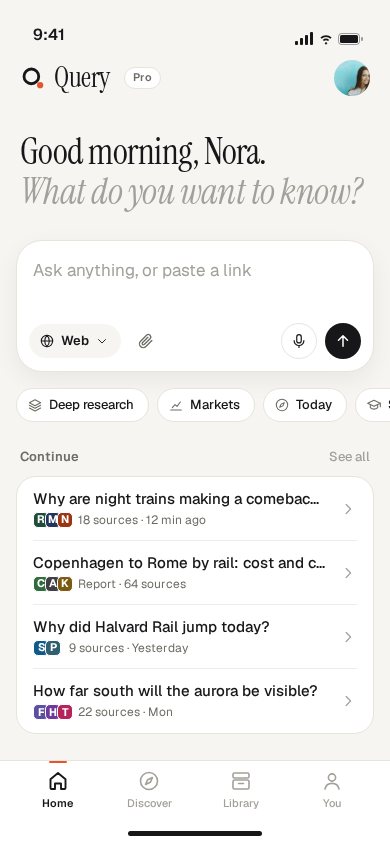
Query is a complete answer engine: welcome, topics, sign in, a home with the ask bar, a search composer, live searching, a cited answer, all sources, a source preview, a follow-up thread, images, deep research and its report, Discover stories, a library, spaces, a market page, voice mode, a Pro plan with checkout and confirmation, notifications, profile and settings. Paper white and ink with one vermilion accent for citations.
| Detail | Value |
|---|---|
| Screen type | Home |
| App | Query: AI answers with sources |
| Category | Productivity |
| Design language | Minimal, light |
| Type | Instrument Serif for headings, Geist for text |
| Colours | #f6f5f1 background, #ffffff surface, #17171a text, #6e6c66 text-muted, #e4572e accent, #fcebe4 accent-tint, #b53f1b accent-dark, #e7e4dc border, #2f8a57 success |
What this screen says
- Query Pro
- Good morning, Nora.
- What do you want to know?
- Ask anything, or paste a link
- Web
- Deep research Markets Today Study
- ContinueSee all
- Why are night trains making a comeback?
- R M N 18 sources · 12 min ago
- Copenhagen to Rome by rail: cost and carbon
- C A K Report · 64 sources
- Why did Halvard Rail jump today?
- S P 9 sources · Yesterday
- How far south will the aurora be visible?
- F H T 22 sources · Mon
- Home
- Discover
- Library
- You
Around it in Query
More home screens
- Replay Home: Record and share screen videos
- Easel Boards: Collaborative whiteboard
- Token Codes: Two-factor codes and sign-in approvals
- Beam Home: Send big files
- Parchment Home: Documents, edit and share
- Lectern Home: Slides and presenter remote
- Ringer Favourites: Phone, contacts and voicemail
- Pipeline Today: Sales CRM on the road
- Aim Today: Goals and key results
- Scribe Home: Voice memos to notes
- Inkline Home: Sign and send contracts
- Dispatch Today: Field service jobs for technicians
Every productivity app home screen
What makes a good home screen
- Put the most important thing first. Decide the one thing most people come for, like today's workout, a balance or the next booking, and give it the top of the screen.
- Make it feel current. Greetings with the time of day, today's date, fresh numbers and recent activity tell people the app is alive and about them.
- Keep quick actions within thumb reach. The two or three things people do most should be one tap away, in the lower part of the screen or a floating button.
- Group related content in clear sections. Use headings and spacing so the screen scans as a few blocks, not a long mixed list.
The full home screen guide and every example
Remix Query free: describe your own app and it is drawn in this design. Or get its files from $10: Figma, React Native, SwiftUI, Flutter and HTML.