Templates · Home screens · Productivity app · Staffroom
Staffroom Home screen
A home screen from Staffroom, a productivity app template in an Enterprise style. Screen 4 of 25.
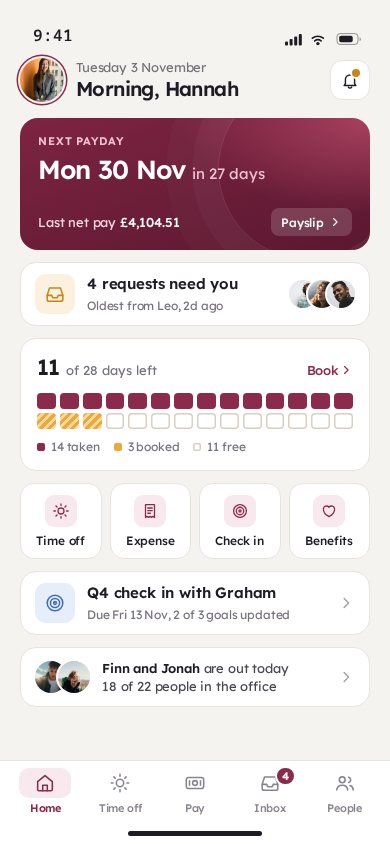
Staffroom is a complete employee HR app: welcome, workspace sign in and a 6 digit code, a home with next payday, requests waiting and the leave balance, a manager inbox with a time off approval, time off balances, a calendar request with review and confirmation, a team absence calendar, pay with a year chart, a full UK payslip, expenses with a receipt scanner and a new claim form, benefits and a health cover plan picker, a people directory, a colleague profile, an org chart, a quarterly check in, notifications, a staff badge profile and settings. Warm stone and white with deep claret and ochre.
| Detail | Value |
|---|---|
| Screen type | Home |
| App | Staffroom: HR, payslips and time off |
| Category | Productivity |
| Design language | Enterprise, light |
| Type | Lexend |
| Colours | #f5f3ef background, #ffffff surface, #1f1b24 text, #77717d text-muted, #8b2a4a accent, #ffffff accent-contrast, #c9851b secondary, #e8e3dc border, #c4422f danger |
What this screen says
- Tuesday 3 November
- Morning, Hannah
- Next payday
- Mon 30 Nov in 27 days
- Last net pay £4,104.51 Payslip
- 4 requests need youOldest from Leo, 2d ago
- 11 of 28 days leftBook
- 14 taken 3 booked 11 free
- Time off
- Expense
- Check in
- Benefits
- Q4 check in with GrahamDue Fri 13 Nov, 2 of 3 goals updated
- Finn and Jonah are out today
- 18 of 22 people in the office
- Home
- Pay
- Inbox4
- People
Around it in Staffroom
More home screens
- Daybook Today: Calendar and planner
- Scanly Home: Document scanner
- Keyring Vault: Password manager
- Rota Home: Shift scheduling for hourly teams
- Inkwell Today: Daily journal
- Shortlist Home: Job search and application tracker
- Parley Home: Team messenger
- Docket Home: Task and sprint planner
- Kanso Home: Tasks, calendar and chat
- Margin Home: AI note taking
- Aide Home: Executive AI assistant
- Juno Home: AI chat assistant
Every productivity app home screen
What makes a good home screen
- Put the most important thing first. Decide the one thing most people come for, like today's workout, a balance or the next booking, and give it the top of the screen.
- Make it feel current. Greetings with the time of day, today's date, fresh numbers and recent activity tell people the app is alive and about them.
- Keep quick actions within thumb reach. The two or three things people do most should be one tap away, in the lower part of the screen or a floating button.
- Group related content in clear sections. Use headings and spacing so the screen scans as a few blocks, not a long mixed list.
The full home screen guide and every example
Remix Staffroom free: describe your own app and it is drawn in this design. Or get its files from $10: Figma, React Native, SwiftUI, Flutter and HTML.