Templates · Live tracking screens · Productivity app · Tunnel
Tunnel Connecting screen
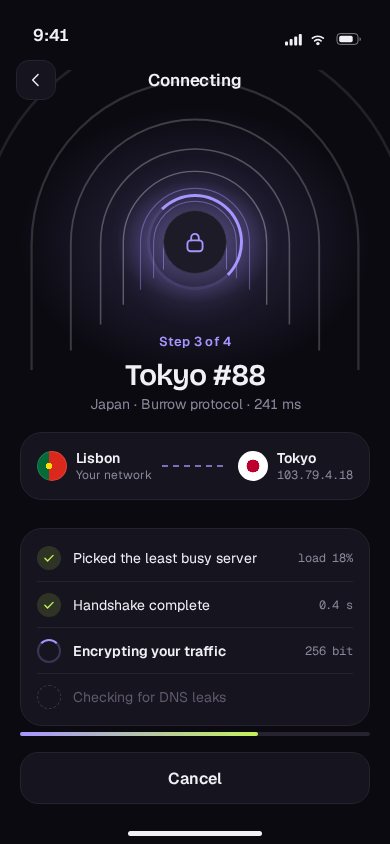
A tracking screen from Tunnel, a VPN and online privacy app template in a Dark-first style. Screen 5 of 25.
Tunnel is a complete VPN and privacy app: welcome, sign in and VPN permission, a one tap connect home inside a glowing tunnel, the connecting handshake, a dot matrix server map, a country list and a country with its cities, live connection details, specialty servers and double hop, protocols, kill switch, split tunnelling, threat protection with a blocked log, a data breach monitor and a leak, a speed test, plans, checkout and a success screen, notifications, account and settings. Aubergine black and plum graphite with signal lime and lavender.
| Detail | Value |
|---|---|
| Screen type | Tracking |
| App | Tunnel: VPN and online privacy |
| Category | Productivity |
| Design language | Dark-first, dark |
| Type | Bricolage Grotesque for headings, Geist for text |
| Colours | #0b0a11 background, #16141e surface, #f2f0f7 text, #8d879b text-muted, #c5f25a accent, #141a05 accent-contrast, #a796ff secondary, #26222f border, #ff6b5b danger |
What this screen says
- Connecting
- Step 3 of 4
- Tokyo #88
- Japan · Burrow protocol · 241 ms
- LisbonYour network
- Tokyo103.79.4.18
- Picked the least busy server
- load 18%
- Handshake complete
- 0.4 s
- Encrypting your traffic
- 256 bit
- Checking for DNS leaks
- Cancel
Around it in Tunnel
More live tracking screens
- Margin Record: AI note taking
- Aide Focus: Executive AI assistant
- Opal Timer: Studio dashboard
- Chrono Ringing: World clock, timers and stopwatch
- Pageview Realtime: Website analytics
- Tapline Live: Link-in-bio pages and analytics
- Canvas Mirror: Design files and comments on mobile
- Merge Checks: Code, pull requests and reviews
- Query Searching: AI answers with sources
- Beacon Find nearby: Find your devices and people
- Ping Testing: Internet speed test
- Easel Voting: Collaborative whiteboard
Every productivity app tracking screen
What makes a good live tracking screen
- The live number is the hero. Arrival time, pace, distance or time left, in large type at the top or centre.
- Show status in words. "Driver is 3 minutes away" or "Halfway there" alongside the map or chart.
- Make it readable while moving. Large numbers, high contrast and big buttons for pause, stop or call.
- Keep updates calm. Smooth movement on the map and steady numbers; jumpy updates feel broken.
The full live tracking screen guide and every example
Remix Tunnel free: describe your own app and it is drawn in this design. Or get its files from $10: Figma, React Native, SwiftUI, Flutter and HTML.