Templates · Home screens · Productivity app · Glossa
Glossa Translate screen
A home screen from Glossa, a productivity app template in a Minimal style. Screen 4 of 25.
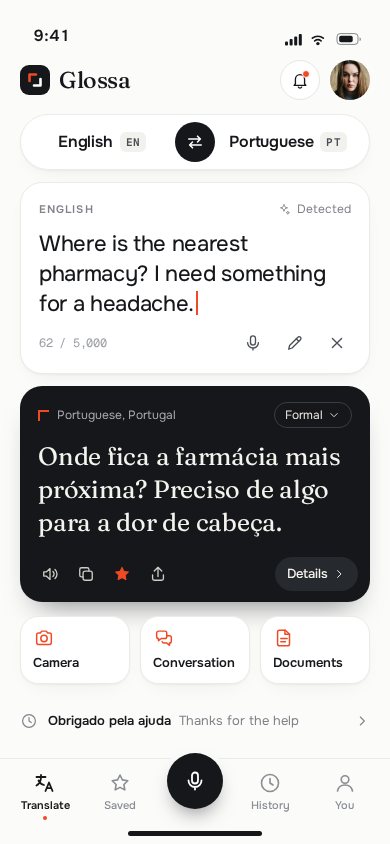
Glossa is a complete translation app: welcome, language setup, sign in, a translator home, a full result with alternatives and examples, a language picker, voice and face to face conversation, live camera translation and a scanned menu, history, saved phrases and a phrasebook, a dictionary word page, documents, offline languages, practice cards, monthly insights, a Pro plan with checkout and confirmation, notifications, profile and settings. Off white and ink with one vermilion accent.
| Detail | Value |
|---|---|
| Screen type | Home |
| App | Glossa: Translate text, voice and camera |
| Category | Productivity |
| Design language | Minimal, light |
| Type | Fraunces for headings, Onest for text |
| Colours | #fbfbfa background, #ffffff surface, #f1f1ee surface-muted, #15171a text, #80838a text-muted, #ef4a23 accent, #fde8e1 accent-soft, #15171a secondary, #ebebe7 border, #1f9d6b success |
What this screen says
- Glossa
- English EN
- Portuguese PT
- English Detected
- Where is the nearest pharmacy? I need something for a headache.
- Portuguese, PortugalFormal
- Onde fica a farmácia mais próxima? Preciso de algo para a dor de cabeça.
- Details
- Camera
- Conversation
- Documents
- Obrigado pela ajuda Thanks for the help
- Translate
- Saved
- History
- You
Around it in Glossa
More home screens
- Stow Home: Cloud storage
- Meridian Start page: Mobile web browser
- Swarm Transfers: Torrent client
- Bench Home: Freelance marketplace
- Convene Home: Video meetings
- Unplug Home: Screen time blocker
- Streak Today: Small days, long chains
- Deskly Home: Hybrid office booking
- Pomo Home: Focus timer
- Postbox Inbox: Email for busy teams
- Daybook Today: Calendar and planner
- Scanly Home: Document scanner
Every productivity app home screen
What makes a good home screen
- Put the most important thing first. Decide the one thing most people come for, like today's workout, a balance or the next booking, and give it the top of the screen.
- Make it feel current. Greetings with the time of day, today's date, fresh numbers and recent activity tell people the app is alive and about them.
- Keep quick actions within thumb reach. The two or three things people do most should be one tap away, in the lower part of the screen or a floating button.
- Group related content in clear sections. Use headings and spacing so the screen scans as a few blocks, not a long mixed list.
The full home screen guide and every example
Remix Glossa free: describe your own app and it is drawn in this design. Or get its files from $10: Figma, React Native, SwiftUI, Flutter and HTML.