Templates · Home screens · Productivity app · Tandem
Tandem Home screen
A home screen from Tandem, a productivity app template in an Enterprise style. Screen 5 of 25.
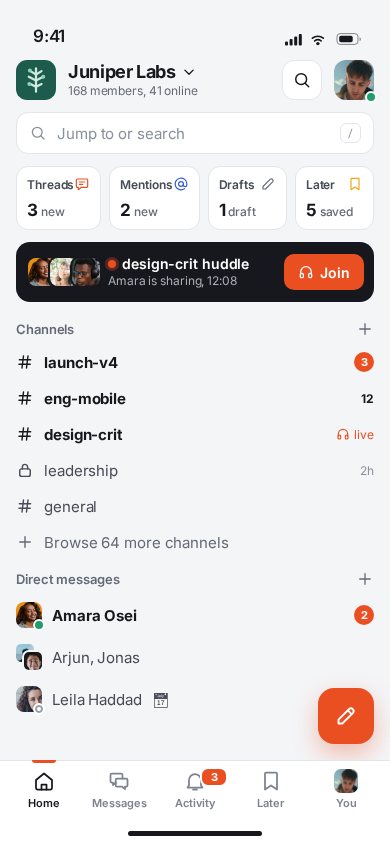
Tandem is a complete team chat app: welcome, sign in with an emailed code, a workspace picker, a home with unread channels, a live huddle and direct messages, a channel with reactions and threads, a thread, a composer with mentions and formatting, direct messages, a live huddle with a shared screen, activity, search, browsing and creating channels, channel details, files, saved for later, setting a status, workspace analytics, a Pro plan with a seat based checkout, profile and notification settings. Cool grey and white with ink and persimmon.
| Detail | Value |
|---|---|
| Screen type | Home |
| App | Tandem: Team chat, channels and huddles |
| Category | Productivity |
| Design language | Enterprise, light |
| Type | Space Grotesk for headings, Inter for text |
| Colours | #f4f5f7 background, #ffffff surface, #16181d text, #646a76 text-muted, #ea4f22 accent, #ffffff accent-contrast, #16181d secondary, #e3e5ea border, #d93a3a danger, #1f9d6a success |
What this screen says
- Juniper Labs 168 members, 41 online
- Jump to or search/
- Threads 3new
- Mentions 2new
- Drafts 1draft
- Later 5saved
- design-crit huddleAmara is sharing, 12:08
- Join
- Channels
- launch-v43
- eng-mobile12
- design-crit live
- leadership2h
- general
- Browse 64 more channels
- Direct messages
- Amara Osei2
- Arjun, Jonas
- Leila Haddad📅
- Home
- Messages
- Activity 3
- Later
- You
Around it in Tandem
More home screens
- Glance Home: Visual search with the camera
- Replay Home: Record and share screen videos
- Easel Boards: Collaborative whiteboard
- Token Codes: Two-factor codes and sign-in approvals
- Beam Home: Send big files
- Parchment Home: Documents, edit and share
- Lectern Home: Slides and presenter remote
- Ringer Favourites: Phone, contacts and voicemail
- Pipeline Today: Sales CRM on the road
- Aim Today: Goals and key results
- Scribe Home: Voice memos to notes
- Inkline Home: Sign and send contracts
Every productivity app home screen
What makes a good home screen
- Put the most important thing first. Decide the one thing most people come for, like today's workout, a balance or the next booking, and give it the top of the screen.
- Make it feel current. Greetings with the time of day, today's date, fresh numbers and recent activity tell people the app is alive and about them.
- Keep quick actions within thumb reach. The two or three things people do most should be one tap away, in the lower part of the screen or a floating button.
- Group related content in clear sections. Use headings and spacing so the screen scans as a few blocks, not a long mixed list.
The full home screen guide and every example
Remix Tandem free: describe your own app and it is drawn in this design. Or get its files from $10: Figma, React Native, SwiftUI, Flutter and HTML.