Templates · Home screens · Productivity app · Sheet
Sheet Home screen
A home screen from Sheet, a spreadsheets and databases app template in an Enterprise style. Screen 4 of 25.
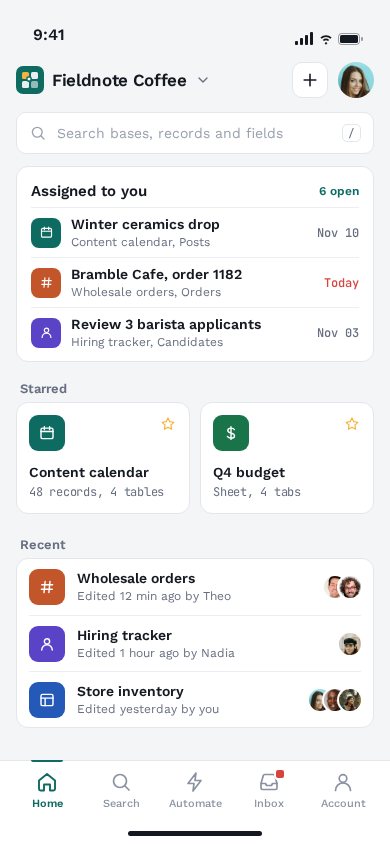
Sheet is a complete team database and spreadsheet app: welcome, sign in with SSO, starting a base from a template, a home of starred and recent bases, a base with its tables and views, a dense grid with typed fields and a frozen first column, an expanded record, adding a field, a formula editor, filters and sort, kanban and calendar views, a request form with its confirmation, search, record activity, a summary dashboard, a classic budget sheet with a formula bar, sharing, automations and an automation builder, a team plan, inbox, account and settings. Cool grey and white with deep spruce, saffron and pastel select tags.
| Detail | Value |
|---|---|
| Screen type | Home |
| App | Sheet: Spreadsheets and databases |
| Category | Productivity |
| Design language | Enterprise, light |
| Type | JetBrains Mono for headings, Work Sans for text |
| Colours | #f4f5f7 background, #ffffff surface, #141821 text, #666e7f text-muted, #0d6b62 accent, #ffffff accent-contrast, #f6b23c secondary, #e3e6eb border, #d6453d danger |
What this screen says
- Fieldnote Coffee
- Search bases, records and fields/
- Assigned to you6 open
- Winter ceramics drop
- Content calendar, Posts
- Nov 10
- Bramble Cafe, order 1182
- Wholesale orders, Orders
- Today
- Review 3 barista applicants
- Hiring tracker, Candidates
- Nov 03
- Starred
- Content calendar
- 48 records, 4 tables
- Q4 budget
- Sheet, 4 tabs
- Recent
- Wholesale orders
- Edited 12 min ago by Theo
- Hiring tracker
- Edited 1 hour ago by Nadia
- Store inventory
- Edited yesterday by you
- Home
- Search
- Automate
- Inbox
- Account
Around it in Sheet
More home screens
- Streak Today: Small days, long chains
- Deskly Home: Hybrid office booking
- Pomo Home: Focus timer
- Postbox Inbox: Email for busy teams
- Daybook Today: Calendar and planner
- Scanly Home: Document scanner
- Keyring Vault: Password manager
- Rota Home: Shift scheduling for hourly teams
- Inkwell Today: Daily journal
- Shortlist Home: Job search and application tracker
- Parley Home: Team messenger
- Docket Home: Task and sprint planner
Every productivity app home screen
What makes a good home screen
- Put the most important thing first. Decide the one thing most people come for, like today's workout, a balance or the next booking, and give it the top of the screen.
- Make it feel current. Greetings with the time of day, today's date, fresh numbers and recent activity tell people the app is alive and about them.
- Keep quick actions within thumb reach. The two or three things people do most should be one tap away, in the lower part of the screen or a floating button.
- Group related content in clear sections. Use headings and spacing so the screen scans as a few blocks, not a long mixed list.
The full home screen guide and every example
Remix Sheet free: describe your own app and it is drawn in this design. Or get its files from $10: Figma, React Native, SwiftUI, Flutter and HTML.