Templates · Search and explore screens · Productivity app · Token
Token Search screen
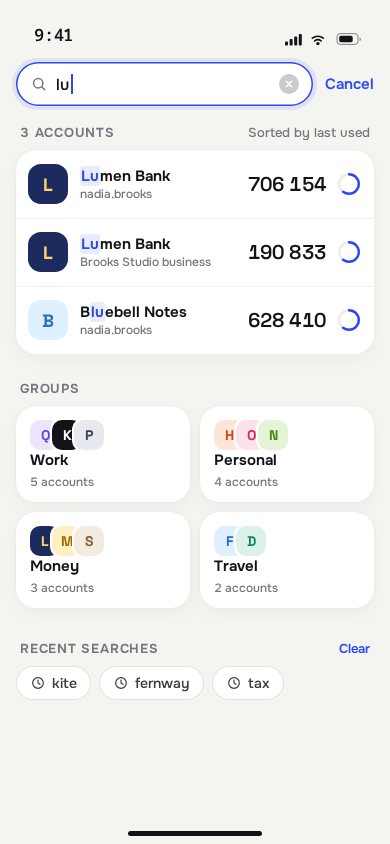
A search screen from Token, a two-factor codes and sign-in approvals app template in a Minimal style. Screen 10 of 25.
Token is a complete authenticator: welcome, phone sign up and code check, app unlock, a codes home with a live 30 second countdown, an account with its big code, scanning a QR code, adding a key by hand and a ready screen, search, a sign-in request with a map and its approval, request history, weekly activity, devices, backups with a backup password and export, editing an account, groups, alerts, a Plus plan, profile and settings. Paper white and ink, cobalt for time and action, vermilion when a code is about to change.
| Detail | Value |
|---|---|
| Screen type | Search |
| App | Token: Two-factor codes and sign-in approvals |
| Category | Productivity |
| Design language | Minimal, light |
| Type | Space Grotesk for headings, Onest for text |
| Colours | #f4f4f1 background, #ffffff surface, #111317 text, #74767d text-muted, #2c47f5 accent, #e9ecfe accent-tint, #e7e7e2 border, #ef4b2b danger, #13a36b success |
What this screen says
- lu
- Cancel
- 3 accounts Sorted by last used
- Lumen Bank
- nadia.brooks
- Brooks Studio business
- Bluebell Notes
- Groups
- Work
- 5 accounts
- Personal
- 4 accounts
- Money
- 3 accounts
- Travel
- 2 accounts
- Recent searches Clear
- kite fernway tax
Around it in Token
More search and explore screens
- Postbox Search: Email for busy teams
- Daybook Search: Calendar and planner
- Scanly Search: Document scanner
- Keyring Search: Password manager
- Inkwell Search: Daily journal
- Shortlist Search: Job search and application tracker
- Parley Search: Team messenger
- Docket Assistant: Task and sprint planner
- Kanso Search: Tasks, calendar and chat
- Margin Search: AI note taking
- Aide Search: Executive AI assistant
- Juno Search: AI chat assistant
Every productivity app search screen
What makes a good search screen
- Show something before people type. Recent searches, popular items or categories make the empty search screen useful and save typing.
- Suggest as people type. Autocomplete with matching items, not only matching words, lets people jump straight to a result.
- Make filters visible and reversible. Show active filters as chips that can be removed in one tap, and the number of results as filters change.
- Forgive typos. Close matches and "Did you mean" stop a spelling mistake from ending in an empty screen.
The full search screen guide and every example
Remix Token free: describe your own app and it is drawn in this design. Or get its files from $10: Figma, React Native, SwiftUI, Flutter and HTML.