Templates · Search and explore screens · Productivity app · Docket
Docket Assistant screen
A search screen from Docket, a task and sprint planner app template in a Dark-first style. Screen 16 of 25.
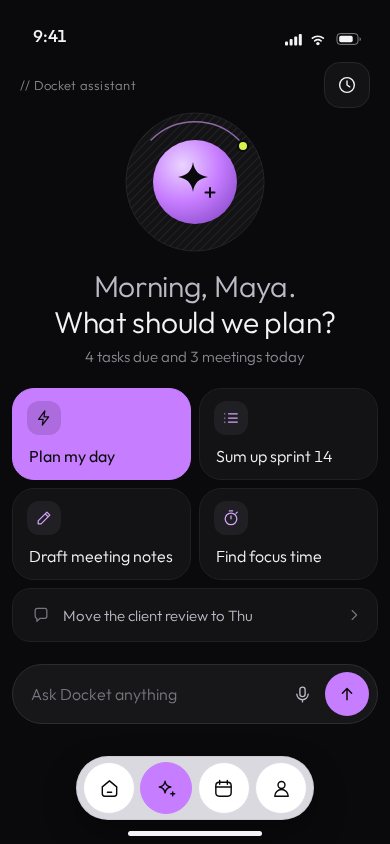
Docket is a complete team planner: welcome, sign in, a home with task progress and today's tasks, task lists and details, a sprint with checkbox rows, a board, a calendar, meetings with a timeline strip and a call screen, an AI helper that plans the day, a focus timer, progress stats, the team, a Pro plan, profile and settings. Near-black with one orchid purple, a lime dot, hatched bars and white sheets with lilac cards.
| Detail | Value |
|---|---|
| Screen type | Search |
| App | Docket: Task and sprint planner |
| Category | Productivity |
| Design language | Dark-first, dark |
| Type | Outfit |
| Colours | #0a0a0c background, #17171a surface, #f5f3f8 text, #8b8a94 text-muted, #c77dff accent, #0a0a0c accent-contrast, #d6f24b secondary, #2a2a30 border, #ff7a7a danger |
What this screen says
- // Docket assistant
- Morning, Maya.
- What should we plan?
- 4 tasks due and 3 meetings today
- Plan my day
- Sum up sprint 14
- Draft meeting notes
- Find focus time
- Move the client review to Thu
- Ask Docket anything
Around it in Docket
More search and explore screens
- Easel Search: Collaborative whiteboard
- Token Search: Two-factor codes and sign-in approvals
- Beam Search: Send big files
- Parchment Search: Documents, edit and share
- Lectern Search: Slides and presenter remote
- Ringer Search: Phone, contacts and voicemail
- Pipeline Search: Sales CRM on the road
- Aim Search: Goals and key results
- Scribe Search: Voice memos to notes
- Inkline Search: Sign and send contracts
- Dispatch Search: Field service jobs for technicians
- Stash Search: Read-it-later and highlights
Every productivity app search screen
What makes a good search screen
- Show something before people type. Recent searches, popular items or categories make the empty search screen useful and save typing.
- Suggest as people type. Autocomplete with matching items, not only matching words, lets people jump straight to a result.
- Make filters visible and reversible. Show active filters as chips that can be removed in one tap, and the number of results as filters change.
- Forgive typos. Close matches and "Did you mean" stop a spelling mistake from ending in an empty screen.
The full search screen guide and every example
Remix Docket free: describe your own app and it is drawn in this design. Or get its files from $10: Figma, React Native, SwiftUI, Flutter and HTML.