Templates · Search and explore screens · Productivity app · Parley
Parley Search screen
A search screen from Parley, a team messenger app template in a Dark-first style. Screen 5 of 25.
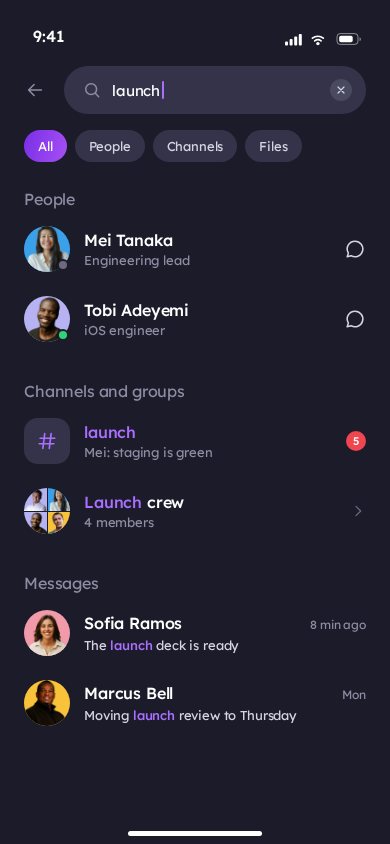
Parley is a complete team messenger: welcome, sign in and a code, a home with a status row and direct and team chats, search, statuses, a one to one chat with voice notes, a team chat with a poll and a shared task, creating a group with an admin and invited members, group info, channels, shared tasks, polls, calls, a video meeting, a weekly team pulse, contacts, profile, notifications, a plan and settings. Dark indigo charcoal with one violet and portraits on flat coloured circles.
| Detail | Value |
|---|---|
| Screen type | Search |
| App | Parley: Team messenger |
| Category | Productivity |
| Design language | Dark-first, dark |
| Type | Lexend |
| Colours | #1c1b29 background, #252437 surface, #ffffff text, #8d8ca3 text-muted, #8b3df0 accent, #ffffff accent-contrast, #f6c443 secondary, #34334a border, #f0464f danger |
What this screen says
- launch
- All People Channels Files
- People
- Mei Tanaka
- Engineering lead
- Tobi Adeyemi
- iOS engineer
- Channels and groups
- Mei: staging is green
- Launch crew
- 4 members
- Messages
- Sofia Ramos8 min ago
- The launch deck is ready
- Marcus BellMon
- Moving launch review to Thursday
Around it in Parley
More search and explore screens
- Staffroom Directory: HR, payslips and time off
- Slot Search: Booking links and meeting scheduling
- Sheet Filter: Spreadsheets and databases
- Tunnel Map: VPN and online privacy
- Ping Servers: Internet speed test
- Glance Results: Visual search with the camera
- Replay Search: Record and share screen videos
- Easel Search: Collaborative whiteboard
- Token Search: Two-factor codes and sign-in approvals
- Beam Search: Send big files
- Parchment Search: Documents, edit and share
- Lectern Search: Slides and presenter remote
Every productivity app search screen
What makes a good search screen
- Show something before people type. Recent searches, popular items or categories make the empty search screen useful and save typing.
- Suggest as people type. Autocomplete with matching items, not only matching words, lets people jump straight to a result.
- Make filters visible and reversible. Show active filters as chips that can be removed in one tap, and the number of results as filters change.
- Forgive typos. Close matches and "Did you mean" stop a spelling mistake from ending in an empty screen.
The full search screen guide and every example
Remix Parley free: describe your own app and it is drawn in this design. Or get its files from $10: Figma, React Native, SwiftUI, Flutter and HTML.