Templates · Search and explore screens · Productivity app · Kanso
Kanso Search screen
A search screen from Kanso, a productivity app template in a Dark-first style. Screen 7 of 24.
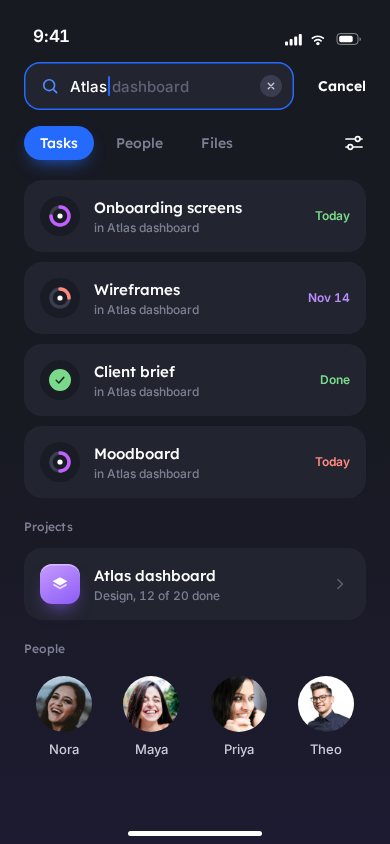
Kanso is a complete team productivity app: onboarding, sign in, a dashboard with the daily goal and a week chart, a projects grid, a project with its task sections, task details with activity, new task, due date and assignees, a calendar, team chat with conversations, teams, search, notifications, productivity stats, a Pro plan, profile and settings. Deep navy with royal blue, orchid purple, salmon and green, and isometric desk scenes drawn for it.
| Detail | Value |
|---|---|
| Screen type | Search |
| App | Kanso: Tasks, calendar and chat |
| Category | Productivity |
| Design language | Dark-first, dark |
| Type | Lexend |
| Colours | #181a22 background, #22242f surface, #ffffff text, #7c8094 text-muted, #246bfd accent, #ffffff accent-contrast, #c25fff secondary, #2e3140 border, #ff8a80 danger |
What this screen says
- Atlasdashboard
- Cancel
- Tasks People Files
- Onboarding screens
- in Atlas dashboard
- Today
- Wireframes
- Nov 14
- Client brief
- Done
- Moodboard
- Projects
- Atlas dashboard
- Design, 12 of 20 done
- People
- Nora
- Maya
- Priya
- Theo
Around it in Kanso
More search and explore screens
- Canvas Search: Design files and comments on mobile
- Merge Search: Code, pull requests and reviews
- Query Ask: AI answers with sources
- Glossa Choose language: Translate text, voice and camera
- Layout Templates: Design anything from templates
- Tick Browse: To-do lists and reminders
- Beacon Search: Find your devices and people
- Staffroom Directory: HR, payslips and time off
- Slot Search: Booking links and meeting scheduling
- Sheet Filter: Spreadsheets and databases
- Tunnel Map: VPN and online privacy
- Ping Servers: Internet speed test
Every productivity app search screen
What makes a good search screen
- Show something before people type. Recent searches, popular items or categories make the empty search screen useful and save typing.
- Suggest as people type. Autocomplete with matching items, not only matching words, lets people jump straight to a result.
- Make filters visible and reversible. Show active filters as chips that can be removed in one tap, and the number of results as filters change.
- Forgive typos. Close matches and "Did you mean" stop a spelling mistake from ending in an empty screen.
The full search screen guide and every example
Remix Kanso free: describe your own app and it is drawn in this design. Or get its files from $10: Figma, React Native, SwiftUI, Flutter and HTML.