Templates · Detail screens · Productivity app · Token
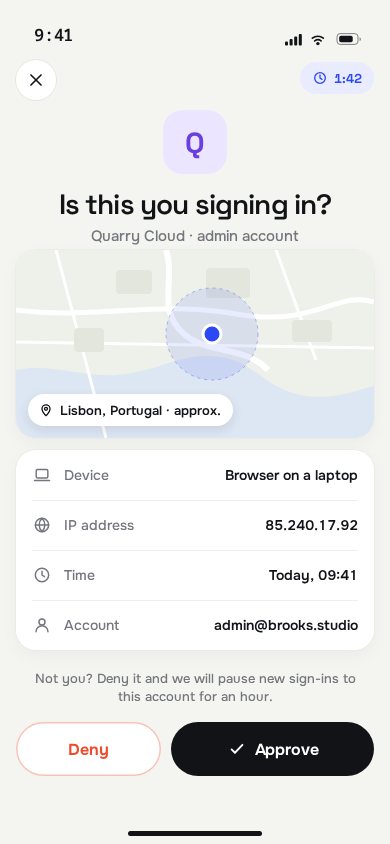
Token Approve sign in screen
A detail screen from Token, a two-factor codes and sign-in approvals app template in a Minimal style. Screen 11 of 25.
Token is a complete authenticator: welcome, phone sign up and code check, app unlock, a codes home with a live 30 second countdown, an account with its big code, scanning a QR code, adding a key by hand and a ready screen, search, a sign-in request with a map and its approval, request history, weekly activity, devices, backups with a backup password and export, editing an account, groups, alerts, a Plus plan, profile and settings. Paper white and ink, cobalt for time and action, vermilion when a code is about to change.
| Detail | Value |
|---|---|
| Screen type | Detail |
| App | Token: Two-factor codes and sign-in approvals |
| Category | Productivity |
| Design language | Minimal, light |
| Type | Space Grotesk for headings, Onest for text |
| Colours | #f4f4f1 background, #ffffff surface, #111317 text, #74767d text-muted, #2c47f5 accent, #e9ecfe accent-tint, #e7e7e2 border, #ef4b2b danger, #13a36b success |
What this screen says
- Is this you signing in?
- Quarry Cloud · admin account
- Lisbon, Portugal · approx.
- Device Browser on a laptop
- IP address 85.240.17.92
- Time Today, 09:41
- Account admin@brooks.studio
- Not you? Deny it and we will pause new sign-ins to this account for an hour.
- Deny
- Approve
Around it in Token
More detail screens
- Stow File preview: Cloud storage
- Meridian Page: Mobile web browser
- Swarm Torrent: Torrent client
- Bench Portfolio item: Freelance marketplace
- Convene Meeting details: Video meetings
- Unplug Blocked: Screen time blocker
- Streak Habit: Small days, long chains
- Deskly Desk: Hybrid office booking
- Pomo Task: Focus timer
- Postbox Thread: Email for busy teams
- Daybook Event: Calendar and planner
- Scanly Document: Document scanner
Every productivity app detail screen
What makes a good detail screen
- Lead with what identifies the item. A large image or title, the price or status, and the key facts at the top. People should know they are in the right place at a glance.
- Keep the main action visible. A sticky bottom button for Add to cart, Book or Play stays reachable while people scroll through details.
- Order information by importance. The facts that decide the choice come first; reviews, specifications and fine print further down.
- Use progressive disclosure. Long descriptions, specifications and policies can expand on tap rather than filling the screen.
The full detail screen guide and every example
Remix Token free: describe your own app and it is drawn in this design. Or get its files from $10: Figma, React Native, SwiftUI, Flutter and HTML.