Templates · Search and explore screens · Productivity app · Shortlist
Shortlist Search screen
A search screen from Shortlist, a job search and application tracker app template in an Enterprise style. Screen 8 of 25.
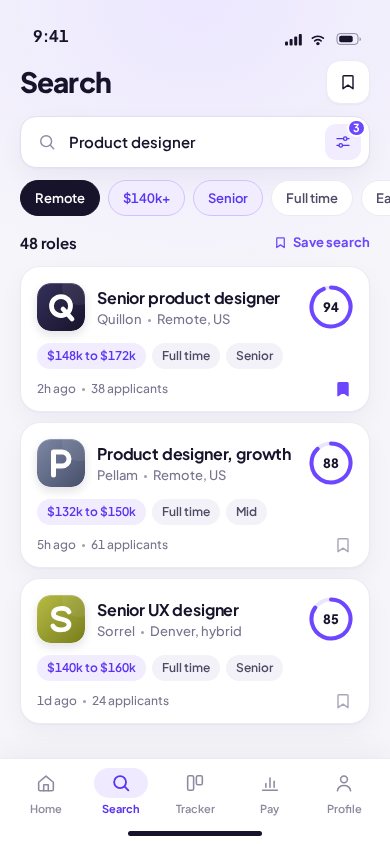
Shortlist is a complete job search app: welcome, sign in, a code and job preferences, a home with today's interview, the pipeline and top matches, search with filters and saved searches, a job page with a match breakdown, the company, a two step application with review and a sent confirmation, a tracker board, one application's timeline, the interview, prep questions with a practice timer, salary insights with a pay distribution, an offer breakdown, a Plus plan, notifications, profile and settings. Every company has its own drawn monogram and every role shows how well it matches.
| Detail | Value |
|---|---|
| Screen type | Search |
| App | Shortlist: Job search and application tracker |
| Category | Productivity |
| Design language | Enterprise, light |
| Type | Plus Jakarta Sans |
| Colours | #f6f5fa background, #ffffff surface, #17132b text, #77738c text-muted, #6c47ff accent, #ffffff accent-contrast, #12a56b secondary, #eceaf4 border, #e5484d danger |
What this screen says
- Search
- Product designer
- Remote $140k+ Senior Full time Easy apply
- 48 roles Save search
- Senior product designer
- QuillonRemote, US
- $148k to $172k Full time Senior
- 2h ago38 applicants
- Product designer, growth
- PellamRemote, US
- $132k to $150k Full time Mid
- 5h ago61 applicants
- Senior UX designer
- SorrelDenver, hybrid
- $140k to $160k Full time Senior
- 1d ago24 applicants
- Home
- Tracker
- Pay
- Profile
Around it in Shortlist
More search and explore screens
- Deskly Search: Hybrid office booking
- Postbox Search: Email for busy teams
- Daybook Search: Calendar and planner
- Scanly Search: Document scanner
- Keyring Search: Password manager
- Inkwell Search: Daily journal
- Parley Search: Team messenger
- Docket Assistant: Task and sprint planner
- Kanso Search: Tasks, calendar and chat
- Margin Search: AI note taking
- Aide Search: Executive AI assistant
- Juno Search: AI chat assistant
Every productivity app search screen
What makes a good search screen
- Show something before people type. Recent searches, popular items or categories make the empty search screen useful and save typing.
- Suggest as people type. Autocomplete with matching items, not only matching words, lets people jump straight to a result.
- Make filters visible and reversible. Show active filters as chips that can be removed in one tap, and the number of results as filters change.
- Forgive typos. Close matches and "Did you mean" stop a spelling mistake from ending in an empty screen.
The full search screen guide and every example
Remix Shortlist free: describe your own app and it is drawn in this design. Or get its files from $10: Figma, React Native, SwiftUI, Flutter and HTML.