Templates · Search and explore screens · Productivity app · Keyring
Keyring Search screen
A search screen from Keyring, a password manager app template in a Dark-first style. Screen 8 of 25.
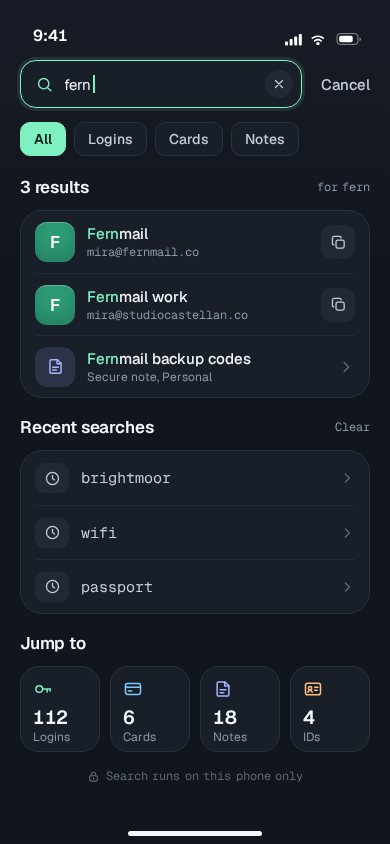
Keyring is a complete password manager: welcome, sign in, a master password with a strength meter, a recovery kit, passcode unlock, the vault home, search, every login, a login with its one-time code and history, new items, a password generator, cards, secure notes, a security score with weak, reused and breached passwords, a breach alert, autofill setup, shared vaults and sharing an item, alerts, a Plus plan, profile and settings. Mint means safe, apricot means weak and coral means breached.
| Detail | Value |
|---|---|
| Screen type | Search |
| App | Keyring: Password manager |
| Category | Productivity |
| Design language | Dark-first, dark |
| Type | Geist |
| Colours | #11151c background, #191f29 surface, #f3f6fa text, #8c97a8 text-muted, #7ef0c1 accent, #0a1f18 accent-contrast, #a7b4ff secondary, #283140 border, #ff7d7d danger |
What this screen says
- fern
- Cancel
- All Logins Cards Notes
- 3 results
- for fern
- Fernmail
- mira@fernmail.co
- Fernmail work
- mira@studiocastellan.co
- Fernmail backup codes
- Secure note, Personal
- Recent searches
- Clear
- brightmoor
- wifi
- passport
- Jump to
- Logins
- Cards
- Notes
- IDs
- Search runs on this phone only
Around it in Keyring
More search and explore screens
- Aim Search: Goals and key results
- Scribe Search: Voice memos to notes
- Inkline Search: Sign and send contracts
- Dispatch Search: Field service jobs for technicians
- Stash Search: Read-it-later and highlights
- Branch Search: Mind maps
- Stow Search: Cloud storage
- Meridian Address bar: Mobile web browser
- Swarm Search: Torrent client
- Bench Categories: Freelance marketplace
- Deskly Search: Hybrid office booking
- Postbox Search: Email for busy teams
Every productivity app search screen
What makes a good search screen
- Show something before people type. Recent searches, popular items or categories make the empty search screen useful and save typing.
- Suggest as people type. Autocomplete with matching items, not only matching words, lets people jump straight to a result.
- Make filters visible and reversible. Show active filters as chips that can be removed in one tap, and the number of results as filters change.
- Forgive typos. Close matches and "Did you mean" stop a spelling mistake from ending in an empty screen.
The full search screen guide and every example
Remix Keyring free: describe your own app and it is drawn in this design. Or get its files from $10: Figma, React Native, SwiftUI, Flutter and HTML.