Templates · Search and explore screens · Productivity app · Aide
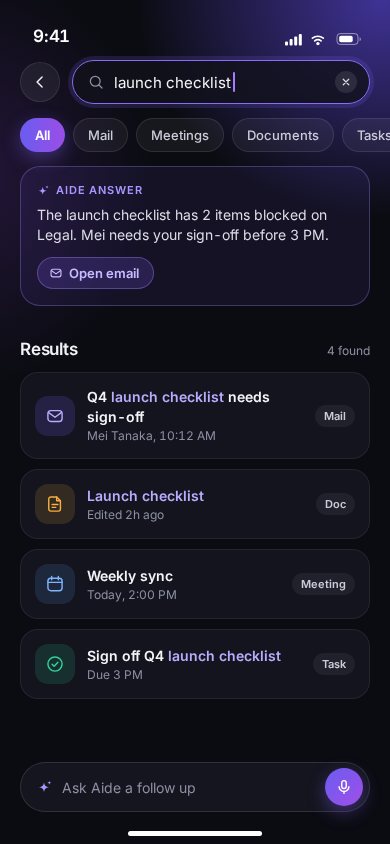
Aide Search screen
A search screen from Aide, an executive AI assistant app template in a Dark-first style. Screen 21 of 25.
Aide is a complete AI chief of staff app: welcome, account and verification, connecting calendar and mail, a home with the daily briefing and agenda timeline, voice and typed commands, an inbox triaged with summaries and ready drafts, meeting briefs with overlap fixes, tasks and delegation, a focus timer, travel and documents at a glance, weekly insights, a plan screen, profile and settings. Near-black with a violet aurora, emerald status marks and amber warnings.
| Detail | Value |
|---|---|
| Screen type | Search |
| App | Aide: Executive AI assistant |
| Category | Productivity |
| Design language | Dark-first, dark |
| Type | Inter |
| Colours | #0b0c12 background, #15161f surface, #f4f4f8 text, #8d90a3 text-muted, #7c5cf2 accent, #ffffff accent-contrast, #34d399 secondary, #262836 border, #f26d78 danger |
What this screen says
- launch checklist
- All Mail Meetings Documents Tasks
- Aide answer
- The launch checklist has 2 items blocked on Legal. Mei needs your sign-off before 3 PM.
- Open email
- Results
- 4 found
- Q4 launch checklist needs sign-off
- Mei Tanaka, 10:12 AM
- Edited 2h ago
- Doc
- Weekly sync
- Today, 2:00 PM
- Meeting
- Sign off Q4 launch checklist
- Due 3 PM
- Task
- Ask Aide a follow up
Around it in Aide
More search and explore screens
- Replay Search: Record and share screen videos
- Easel Search: Collaborative whiteboard
- Token Search: Two-factor codes and sign-in approvals
- Beam Search: Send big files
- Parchment Search: Documents, edit and share
- Lectern Search: Slides and presenter remote
- Ringer Search: Phone, contacts and voicemail
- Pipeline Search: Sales CRM on the road
- Aim Search: Goals and key results
- Scribe Search: Voice memos to notes
- Inkline Search: Sign and send contracts
- Dispatch Search: Field service jobs for technicians
Every productivity app search screen
What makes a good search screen
- Show something before people type. Recent searches, popular items or categories make the empty search screen useful and save typing.
- Suggest as people type. Autocomplete with matching items, not only matching words, lets people jump straight to a result.
- Make filters visible and reversible. Show active filters as chips that can be removed in one tap, and the number of results as filters change.
- Forgive typos. Close matches and "Did you mean" stop a spelling mistake from ending in an empty screen.
The full search screen guide and every example
Remix Aide free: describe your own app and it is drawn in this design. Or get its files from $10: Figma, React Native, SwiftUI, Flutter and HTML.