Templates · Search and explore screens · Productivity app · Juno
Juno Search screen
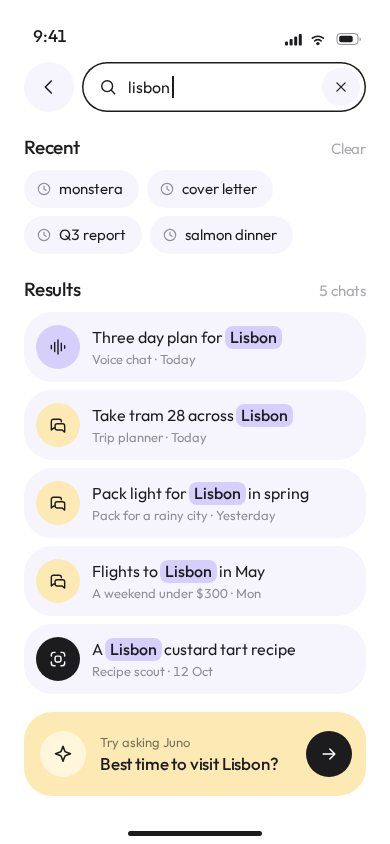
A search screen from Juno, an AI chat assistant app template in a Playful style. Screen 14 of 25.
Juno is a complete AI assistant app: onboarding, sign in, a home of big pastel action cards, chat with charts in the answers, voice mode, search by image, image creation, a model picker, history, search, a saved library, a prompt gallery, custom assistants, plans with checkout, usage, profile and settings. Soft lavender and butter yellow on white with black pills and a ribbon of curved text.
| Detail | Value |
|---|---|
| Screen type | Search |
| App | Juno: AI chat assistant |
| Category | Productivity |
| Design language | Playful, light |
| Type | Outfit |
| Colours | #ffffff background, #f6f5fd surface, #1c1c1f text, #8e8d99 text-muted, #d6cffb accent, #1c1c1f accent-contrast, #fde9b4 secondary, #ecebf5 border, #f26a6a danger |
What this screen says
- lisbon
- RecentClear
- monstera cover letter Q3 report salmon dinner
- Results5 chats
- Three day plan for LisbonVoice chat · Today
- Take tram 28 across LisbonTrip planner · Today
- Pack light for Lisbon in springPack for a rainy city · Yesterday
- Flights to Lisbon in MayA weekend under $300 · Mon
- A Lisbon custard tart recipeRecipe scout · 12 Oct
- Try asking Juno Best time to visit Lisbon?
Around it in Juno
More search and explore screens
- Tunnel Map: VPN and online privacy
- Ping Servers: Internet speed test
- Glance Results: Visual search with the camera
- Replay Search: Record and share screen videos
- Easel Search: Collaborative whiteboard
- Token Search: Two-factor codes and sign-in approvals
- Beam Search: Send big files
- Parchment Search: Documents, edit and share
- Lectern Search: Slides and presenter remote
- Ringer Search: Phone, contacts and voicemail
- Pipeline Search: Sales CRM on the road
- Aim Search: Goals and key results
Every productivity app search screen
What makes a good search screen
- Show something before people type. Recent searches, popular items or categories make the empty search screen useful and save typing.
- Suggest as people type. Autocomplete with matching items, not only matching words, lets people jump straight to a result.
- Make filters visible and reversible. Show active filters as chips that can be removed in one tap, and the number of results as filters change.
- Forgive typos. Close matches and "Did you mean" stop a spelling mistake from ending in an empty screen.
The full search screen guide and every example
Remix Juno free: describe your own app and it is drawn in this design. Or get its files from $10: Figma, React Native, SwiftUI, Flutter and HTML.