Templates · Search and explore screens · Productivity app · Scanly
Scanly Search screen
A search screen from Scanly, a document scanner app template in a Clinical style. Screen 20 of 25.
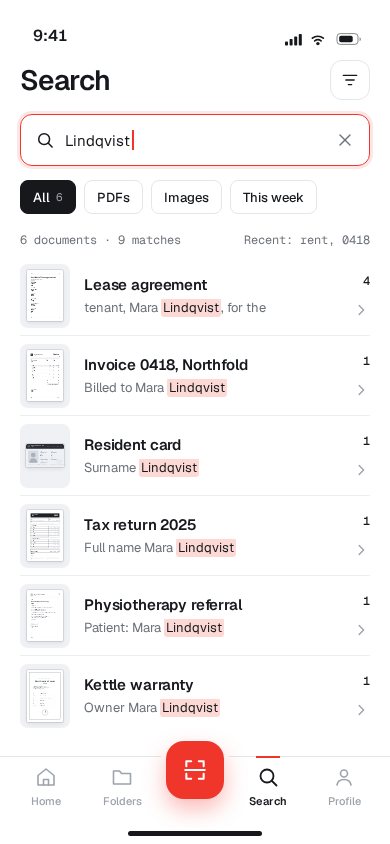
Scanly is a complete document scanner: welcome, sign in, a code, camera access, a home with recent scans, the camera with edge detection, crop, filters, page order, the document, recognised text, signing, details, export and a done screen, folders, a folder, search inside scans, usage, a Pro plan, profile, settings and an app lock. White screens for filing, graphite screens for the camera and editor, and one red for the scan line.
| Detail | Value |
|---|---|
| Screen type | Search |
| App | Scanly: Document scanner |
| Category | Productivity |
| Design language | Clinical, light |
| Type | Geist |
| Colours | #ffffff background, #f5f6f8 surface, #16181c text, #6b7178 text-muted, #f0352b accent, #ffffff accent-contrast, #2a2d33 secondary, #e4e6ea border, #c4221a danger |
What this screen says
- Search
- Lindqvist
- All6 PDFs Images This week
- 6 documents · 9 matches Recent: rent, 0418
- Lease agreement
- tenant, Mara Lindqvist, for the
- Invoice 0418, Northfold
- Billed to Mara Lindqvist
- Resident card
- Surname Lindqvist
- Tax return 2025
- Full name Mara Lindqvist
- Physiotherapy referral
- Patient: Mara Lindqvist
- Kettle warranty
- Owner Mara Lindqvist
- Home
- Folders
- Profile
Around it in Scanly
More search and explore screens
- Daybook Search: Calendar and planner
- Keyring Search: Password manager
- Inkwell Search: Daily journal
- Shortlist Search: Job search and application tracker
- Parley Search: Team messenger
- Docket Assistant: Task and sprint planner
- Kanso Search: Tasks, calendar and chat
- Margin Search: AI note taking
- Aide Search: Executive AI assistant
- Juno Search: AI chat assistant
- Opal Search: Studio dashboard
- Jot Search: Quick notes and checklists
Every productivity app search screen
What makes a good search screen
- Show something before people type. Recent searches, popular items or categories make the empty search screen useful and save typing.
- Suggest as people type. Autocomplete with matching items, not only matching words, lets people jump straight to a result.
- Make filters visible and reversible. Show active filters as chips that can be removed in one tap, and the number of results as filters change.
- Forgive typos. Close matches and "Did you mean" stop a spelling mistake from ending in an empty screen.
The full search screen guide and every example
Remix Scanly free: describe your own app and it is drawn in this design. Or get its files from $10: Figma, React Native, SwiftUI, Flutter and HTML.