Templates · Home screens · Finance app · Compound
Compound Home screen
A home screen from Compound, a mutual funds and SIPs app template in a Minimal style. Screen 5 of 25.
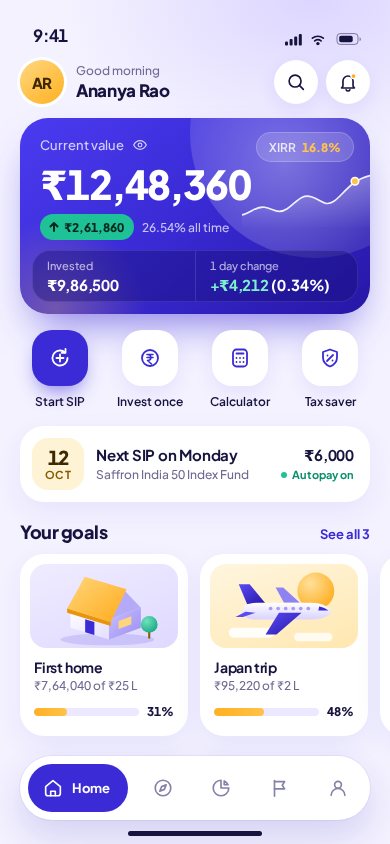
Compound is a complete mutual fund app for Indian investors: welcome, mobile sign in with OTP, KYC, a home with the portfolio value and XIRR, fund discovery, lists and fund pages with returns and a risk meter, holdings, compare, a SIP calculator, starting a SIP with an autopay mandate, one time investments, an order confirmation, investments, SIPs, goals, portfolio analysis, tax, transactions, profile and settings. Lavender white with deep indigo, marigold and mint, amounts in rupees with Indian grouping.
| Detail | Value |
|---|---|
| Screen type | Home |
| App | Compound: Mutual funds and SIPs |
| Category | Finance |
| Design language | Minimal, light |
| Type | Plus Jakarta Sans |
| Colours | #f4f2ff background, #ffffff surface, #17133f text, #6e6a93 text-muted, #3a2bd6 accent, #ffffff accent-contrast, #ffc24a secondary, #e7e3fb border, #e5484d danger |
What this screen says
- AR
- Good morning
- Ananya Rao
- Current value
- XIRR 16.8%
- ₹2,61,86026.54% all time
- Invested
- 1 day change
- +₹4,212 (0.34%)
- Start SIP
- Invest once
- Calculator
- Tax saver
- 12OCT
- Next SIP on Monday
- Saffron India 50 Index Fund
- Autopay on
- Your goals
- See all 3
- First home
- ₹7,64,040 of ₹25 L
- Japan trip
- ₹95,220 of ₹2 L
- Aarav
- Home
Around it in Compound
More home screens
- Fathom Home: Crypto wallet
- Marigold Home: Mobile banking
- Zentra Home: Crypto trading
- Payday Home: Payroll for small teams
- Roundup Home: Invest your spare change
- Envelope Budget: Give every dollar a job
- Recur Home: Track and cancel subscriptions
- Keel Home: Corporate cards and spend controls
- Giftly Home: Gift cards, sent and stored
- Zap Home: Pay friends with a note
- Billfold Wallet: Cards, passes and tickets wallet
- Payly Home: UPI payments, recharges and bills
What makes a good home screen
- Put the most important thing first. Decide the one thing most people come for, like today's workout, a balance or the next booking, and give it the top of the screen.
- Make it feel current. Greetings with the time of day, today's date, fresh numbers and recent activity tell people the app is alive and about them.
- Keep quick actions within thumb reach. The two or three things people do most should be one tap away, in the lower part of the screen or a floating button.
- Group related content in clear sections. Use headings and spacing so the screen scans as a few blocks, not a long mixed list.
The full home screen guide and every example
Remix Compound free: describe your own app and it is drawn in this design. Or get its files from $10: Figma, React Native, SwiftUI, Flutter and HTML.