Templates · Home screens · Finance app · Claim
Claim Home screen
A home screen from Claim, a finance app template in a Minimal style. Screen 4 of 25.
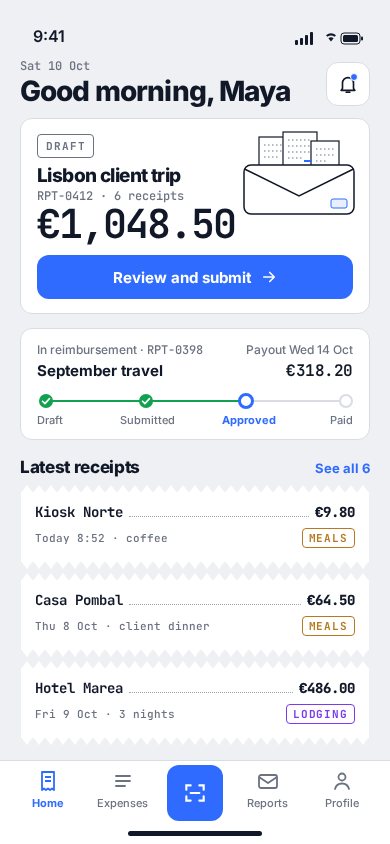
Claim is claim covers expenses end to end: scan a receipt, categorise it, log mileage and per diems, gather everything into a report, submit it and follow the reimbursement from draft to paid. It also has search, spending stats, cards, notifications, a Claim Plus plan, profile and settings.
| Detail | Value |
|---|---|
| Screen type | Home |
| App | Claim: Expenses, filed like a till receipt |
| Category | Finance |
| Design language | Minimal, light |
| Type | Inter |
| Colours | #eef0f3 background, #ffffff surface, #111827 text, #6b7280 text-muted, #2f6bff accent, #ffffff accent-contrast, #12a150 secondary, #d9dde3 border, #d92d20 danger |
What this screen says
- Sat 10 Oct
- Good morning, Maya
- Draft
- Lisbon client trip
- RPT-0412 · 6 receipts
- Review and submit
- In reimbursement · RPT-0398 Payout Wed 14 Oct
- September travel€318.20
- Draft Submitted Approved Paid
- Latest receipts
- See all 6
- Kiosk Norte €9.80
- Today 8:52 · coffee Meals
- Casa Pombal €64.50
- Thu 8 Oct · client dinner Meals
- Hotel Marea €486.00
- Fri 9 Oct · 3 nights Lodging
- Home
- Expenses
- Reports
- Profile
Around it in Claim
More home screens
- Remit Home: International money transfer
- Piggy Home: Pocket money for kids
- Settle Home: Bill payments and banking
- Fathom Home: Crypto wallet
- Marigold Home: Mobile banking
- Zentra Home: Crypto trading
- Payday Home: Payroll for small teams
- Roundup Home: Invest your spare change
- Envelope Budget: Give every dollar a job
- Recur Home: Track and cancel subscriptions
- Keel Home: Corporate cards and spend controls
- Giftly Home: Gift cards, sent and stored
What makes a good home screen
- Put the most important thing first. Decide the one thing most people come for, like today's workout, a balance or the next booking, and give it the top of the screen.
- Make it feel current. Greetings with the time of day, today's date, fresh numbers and recent activity tell people the app is alive and about them.
- Keep quick actions within thumb reach. The two or three things people do most should be one tap away, in the lower part of the screen or a floating button.
- Group related content in clear sections. Use headings and spacing so the screen scans as a few blocks, not a long mixed list.
The full home screen guide and every example
Remix Claim free: describe your own app and it is drawn in this design. Or get its files from $10: Figma, React Native, SwiftUI, Flutter and HTML.