Templates · Home screens · Finance app · Lease
Lease Home screen
A home screen from Lease, a finance app template in an Enterprise style. Screen 5 of 25.
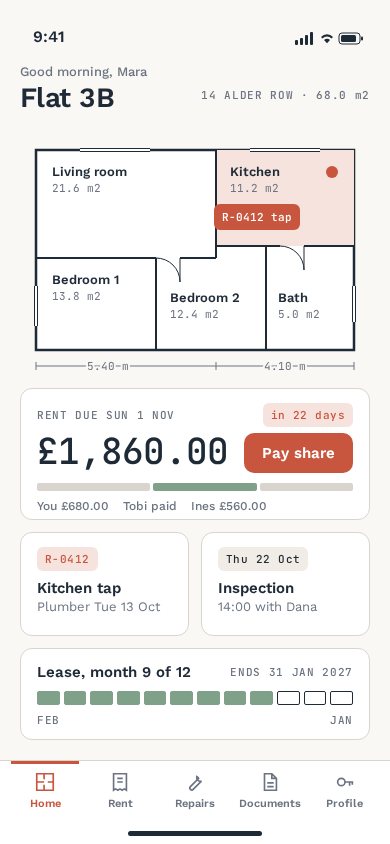
Lease is lease keeps a tenancy in order. The home screen is a drawn floor plan of the flat with rent, repairs and inspections pinned to it. Rent is paid and split between flatmates with receipt stubs, repairs run on a ticket with a status rail, and the lease, inventory and deposit live as document sheets. It also covers booking an inspection, yearly costs, search, notifications, a Lease Plus plan, profile and settings.
| Detail | Value |
|---|---|
| Screen type | Home |
| App | Lease: Your tenancy, drawn to plan |
| Category | Finance |
| Design language | Enterprise, light |
| Type | Work Sans |
| Colours | #faf8f5 background, #ffffff surface, #1f2a37 text, #6b7480 text-muted, #c8553d accent, #ffffff accent-contrast, #7fa089 secondary, #d9d5ce border, #b3261e danger |
What this screen says
- Good morning, Mara
- Flat 3B
- 14 ALDER ROW · 68.0 m2
- R-0412 tap
- RENT DUE SUN 1 NOV in 22 days
- You £680.00 Tobi paid Ines £560.00
- Pay share
- R-0412 Kitchen tap
- Plumber Tue 13 Oct
- Thu 22 Oct Inspection
- 14:00 with Dana
- Lease, month 9 of 12 ENDS 31 JAN 2027
- FEB JAN
- Home
- Rent
- Repairs
- Documents
- Profile
Around it in Lease
More home screens
- Later Home: Buy now, pay in four
- Standing Home: Credit score and reports
- Accrue Home: Retirement and pension planner
- Levy Home: Taxes for freelancers
- Bullion Home: Gold and silver savings
- Wage Home: Get paid as you work
- Keystone Home: Mortgage and home loan tracker
- Rebate Home: Cashback card and rewards
- Aegis Home: Insurance policies and claims
- Till Today: Card reader and sales for small shops
- Strike Home: Options trading
- Prism Net worth: Net worth across every account
What makes a good home screen
- Put the most important thing first. Decide the one thing most people come for, like today's workout, a balance or the next booking, and give it the top of the screen.
- Make it feel current. Greetings with the time of day, today's date, fresh numbers and recent activity tell people the app is alive and about them.
- Keep quick actions within thumb reach. The two or three things people do most should be one tap away, in the lower part of the screen or a floating button.
- Group related content in clear sections. Use headings and spacing so the screen scans as a few blocks, not a long mixed list.
The full home screen guide and every example
Remix Lease free: describe your own app and it is drawn in this design. Or get its files from $10: Figma, React Native, SwiftUI, Flutter and HTML.