Templates · Home screens · Finance app · Billable
Billable Home screen
A home screen from Billable, a finance app template in a Minimal style. Screen 5 of 25.
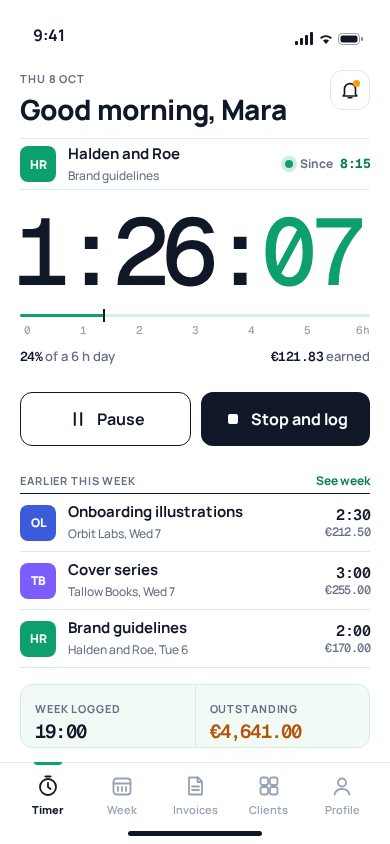
Billable is billable covers a freelancer's whole billing loop: run a timer per client, review the day and the week as blocks of hours, manage clients and projects, then build, send and chase invoices. Reports, notifications, a Pro plan, profile and settings round it out.
| Detail | Value |
|---|---|
| Screen type | Home |
| App | Billable: Time tracking and invoices, kept like a ledger |
| Category | Finance |
| Design language | Minimal, light |
| Type | Manrope |
| Colours | #ffffff background, #f1faf5 surface, #101828 text, #667085 text-muted, #0e9f6e accent, #ffffff accent-contrast, #f59e0b secondary, #d5eee2 border, #d92d20 danger |
What this screen says
- Thu 8 Oct
- Good morning, Mara
- HR
- Halden and RoeBrand guidelines
- Since 8:15
- 0 1 2 3 4 5 6h
- 24% of a 6 h day €121.83 earned
- Pause
- Stop and log
- Earlier this week
- See week
- OL
- Onboarding illustrationsOrbit Labs, Wed 7
- TB
- Cover seriesTallow Books, Wed 7
- Brand guidelinesHalden and Roe, Tue 6
- Week logged 19:00
- Outstanding €4,641.00
- Timer
- Week
- Invoices
- Clients
- Profile
Around it in Billable
More home screens
- Billfold Wallet: Cards, passes and tickets wallet
- Payly Home: UPI payments, recharges and bills
- Crest Home: Credit card bills and rewards
- Storefront Home: Run your online store
- Bastion Accounts: Everyday banking from a big bank
- Later Home: Buy now, pay in four
- Standing Home: Credit score and reports
- Accrue Home: Retirement and pension planner
- Levy Home: Taxes for freelancers
- Bullion Home: Gold and silver savings
- Wage Home: Get paid as you work
- Keystone Home: Mortgage and home loan tracker
What makes a good home screen
- Put the most important thing first. Decide the one thing most people come for, like today's workout, a balance or the next booking, and give it the top of the screen.
- Make it feel current. Greetings with the time of day, today's date, fresh numbers and recent activity tell people the app is alive and about them.
- Keep quick actions within thumb reach. The two or three things people do most should be one tap away, in the lower part of the screen or a floating button.
- Group related content in clear sections. Use headings and spacing so the screen scans as a few blocks, not a long mixed list.
The full home screen guide and every example
Remix Billable free: describe your own app and it is drawn in this design. Or get its files from $10: Figma, React Native, SwiftUI, Flutter and HTML.