Templates · Home screens · Education app · Homeroom
Homeroom Home screen
A home screen from Homeroom, an education app template in a Playful style. Screen 4 of 25.
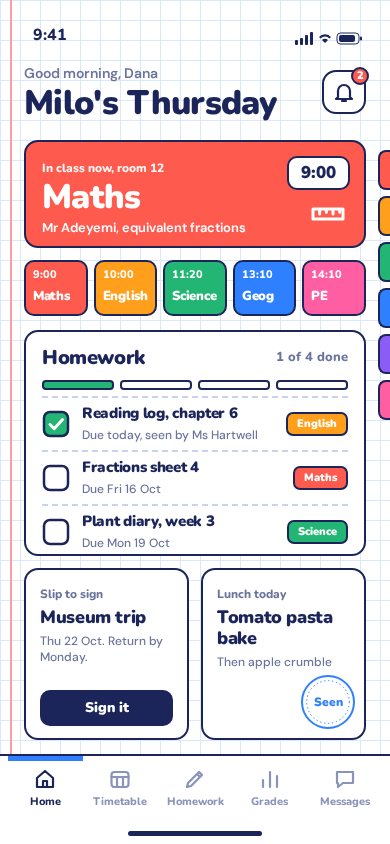
Homeroom is homeroom covers the school week for a family: the day's timetable, homework with drawn tick boxes and a hand in flow, grades by subject and a report card, messages from teachers, permission slips with a signature line, the lunch menu, attendance and the school calendar. It also has onboarding, notices, a paywall, profile and settings.
| Detail | Value |
|---|---|
| Screen type | Home |
| App | Homeroom: School, all on one page |
| Category | Education |
| Design language | Playful, light |
| Type | DM Sans |
| Colours | #ffffff background, #f1f5ff surface, #1b2559 text, #6b749c text-muted, #ff5a4e accent, #ffffff accent-contrast, #2f80ff secondary, #c9d3ee border, #ff5a4e danger |
What this screen says
- Good morning, Dana
- Milo's Thursday
- In class now, room 12Maths
- Mr Adeyemi, equivalent fractions
- 9:00Maths
- 10:00English
- 11:20Science
- 13:10Geog
- 14:10PE
- Homework
- 1 of 4 done
- Reading log, chapter 6Due today, seen by Ms Hartwell
- English
- Fractions sheet 4Due Fri 16 Oct
- Maths
- Plant diary, week 3Due Mon 19 Oct
- Science
- Slip to signMuseum trip
- Thu 22 Oct. Return by Monday.
- Sign it
- Lunch todayTomato pasta bake
- Then apple crumble
- Home
- Timetable
- Grades
- Messages
Around it in Homeroom
More home screens
- Leaf Home: E-books and reading
- Almanac Explore: The free encyclopedia reader
- Tiles Today: Daily word and number puzzles
- Stacks Home: Borrow e-books and audiobooks from your library
- Penpal Partners: Language exchange chat
- Lexis Today: A word a day
- Quanta Home: Interactive physics lessons
- Cram Home: Exam prep and mock tests
- Quad Today: University campus app
- Palm Home: Learn sign language
- Epoch Today: History on a timeline
- Wren Home: Early reading for kids
Every education app home screen
What makes a good home screen
- Put the most important thing first. Decide the one thing most people come for, like today's workout, a balance or the next booking, and give it the top of the screen.
- Make it feel current. Greetings with the time of day, today's date, fresh numbers and recent activity tell people the app is alive and about them.
- Keep quick actions within thumb reach. The two or three things people do most should be one tap away, in the lower part of the screen or a floating button.
- Group related content in clear sections. Use headings and spacing so the screen scans as a few blocks, not a long mixed list.
The full home screen guide and every example
Remix Homeroom free: describe your own app and it is drawn in this design. Or get its files from $10: Figma, React Native, SwiftUI, Flutter and HTML.