Templates · Home screens · Finance app · Bastion
Bastion Accounts screen
A home screen from Bastion, a finance app template in an Enterprise style. Screen 4 of 25.
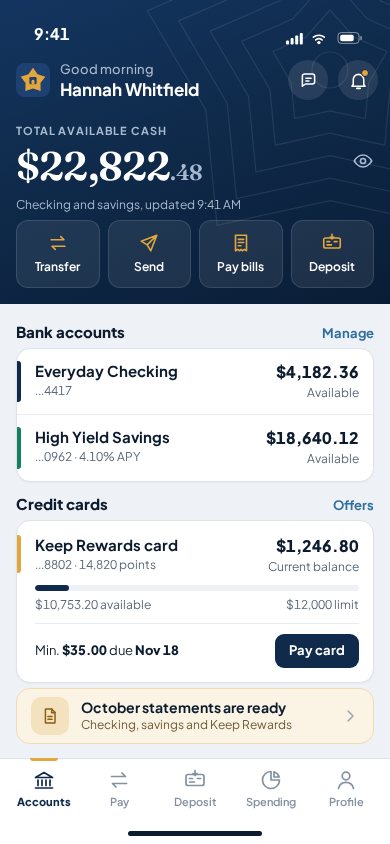
Bastion is a complete big bank app: welcome, sign in, a one time code, an accounts overview, checking, savings and credit card pages, a transaction, the pay and transfer hub, a transfer with review and confirmation, send to a phone or email, bill pay, check deposit with a capture camera, card controls, spending insights, statements, a branch and ATM finder, alerts, secure messages, the Citadel premium tier, profile and settings. Cool grey and white with harbour navy, rampart gold and a quiet green for money in.
| Detail | Value |
|---|---|
| Screen type | Home |
| App | Bastion: Everyday banking from a big bank |
| Category | Finance |
| Design language | Enterprise, light |
| Type | Fraunces for headings, Plus Jakarta Sans for text |
| Colours | #eef1f5 background, #ffffff surface, #0c1b2e text, #5b6879 text-muted, #0f2a4a primary, #e3a63c accent, #13805f success, #2f6f9f secondary, #dde3ea border, #c2412d danger |
What this screen says
- Good morning
- Hannah Whitfield
- Total available cash
- Checking and savings, updated 9:41 AM
- Transfer
- Send
- Pay bills
- Deposit
- Bank accountsManage
- Everyday Checking
- $4,182.36Available
- High Yield Savings
- ...0962 · 4.10% APY
- $18,640.12Available
- Credit cardsOffers
- Keep Rewards card
- ...8802 · 14,820 points
- Current balance
- $10,753.20 available $12,000 limit
- Min. $35.00 due Nov 18
- Pay card
- October statements are ready
- Checking, savings and Keep Rewards
- Accounts
- Pay
- Spending
- Profile
Around it in Bastion
More home screens
- Till Today: Card reader and sales for small shops
- Strike Home: Options trading
- Prism Net worth: Net worth across every account
- Folio Portfolio: Stocks and ETF investing
- Compound Home: Mutual funds and SIPs
- Halden Home: Premium neobank
- Billable Home: Time tracking and invoices, kept like a ledger
- Lease Home: Your tenancy, drawn to plan
- Claim Home: Expenses, filed like a till receipt
- Tally Home: Monthly budgeting
- Divvy Home: Split bills with friends
- Ticker Home: Stock investing
What makes a good home screen
- Put the most important thing first. Decide the one thing most people come for, like today's workout, a balance or the next booking, and give it the top of the screen.
- Make it feel current. Greetings with the time of day, today's date, fresh numbers and recent activity tell people the app is alive and about them.
- Keep quick actions within thumb reach. The two or three things people do most should be one tap away, in the lower part of the screen or a floating button.
- Group related content in clear sections. Use headings and spacing so the screen scans as a few blocks, not a long mixed list.
The full home screen guide and every example
Remix Bastion free: describe your own app and it is drawn in this design. Or get its files from $10: Figma, React Native, SwiftUI, Flutter and HTML.