Templates · Home screens · Finance app · Ticker
Ticker Home screen
A home screen from Ticker, a stock investing app template in a Dark-first style. Screen 5 of 25.
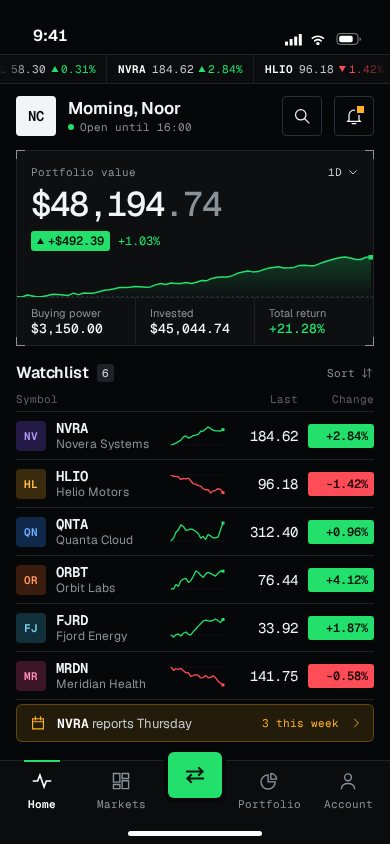
Ticker is a complete stock investing app: welcome, sign in, account creation and a passcode, a home with portfolio value and a dense watchlist, search, markets with indices and a sector heatmap, movers, a stock page with candles and key stats, a full chart, an order ticket with a keypad, review and confirmation, orders, portfolio and holdings, news and a story, an earnings calendar, price alerts, adding funds, a Pro plan, notifications, account and settings. Green means up or buy and red means down or sell, nowhere else.
| Detail | Value |
|---|---|
| Screen type | Home |
| App | Ticker: Stock investing |
| Category | Finance |
| Design language | Dark-first, dark |
| Type | Geist |
| Colours | #060708 background, #0d0f11 surface, #f2f4f5 text, #8a9299 text-muted, #22e06b accent, #03140a accent-contrast, #ffb224 secondary, #1e2226 border, #ff4d57 danger |
What this screen says
- NC
- Morning, Noor
- Open until 16:00
- Portfolio value 1D
- Buying power
- Invested
- Total return
- Watchlist
- 6Sort
- Symbol Last Change
- NV
- NVRA
- Novera Systems
- HL
- HLIO
- Helio Motors
- QN
- QNTA
- Quanta Cloud
- OR
- ORBT
- Orbit Labs
- FJ
- FJRD
- Fjord Energy
- MR
- MRDN
- Meridian Health
- NVRA reports Thursday
- 3 this week
Around it in Ticker
More home screens
- Tally Home: Monthly budgeting
- Divvy Home: Split bills with friends
- Burrow Home: Shared savings pots
- Remit Home: International money transfer
- Piggy Home: Pocket money for kids
- Settle Home: Bill payments and banking
- Fathom Home: Crypto wallet
- Marigold Home: Mobile banking
- Zentra Home: Crypto trading
- Payday Home: Payroll for small teams
- Roundup Home: Invest your spare change
- Envelope Budget: Give every dollar a job
What makes a good home screen
- Put the most important thing first. Decide the one thing most people come for, like today's workout, a balance or the next booking, and give it the top of the screen.
- Make it feel current. Greetings with the time of day, today's date, fresh numbers and recent activity tell people the app is alive and about them.
- Keep quick actions within thumb reach. The two or three things people do most should be one tap away, in the lower part of the screen or a floating button.
- Group related content in clear sections. Use headings and spacing so the screen scans as a few blocks, not a long mixed list.
The full home screen guide and every example
Remix Ticker free: describe your own app and it is drawn in this design. Or get its files from $10: Figma, React Native, SwiftUI, Flutter and HTML.