Templates · Home screens · Finance app · Divvy
Divvy Home screen
A home screen from Divvy, a split bills with friends app template in a Neubrutalism style. Screen 4 of 25.
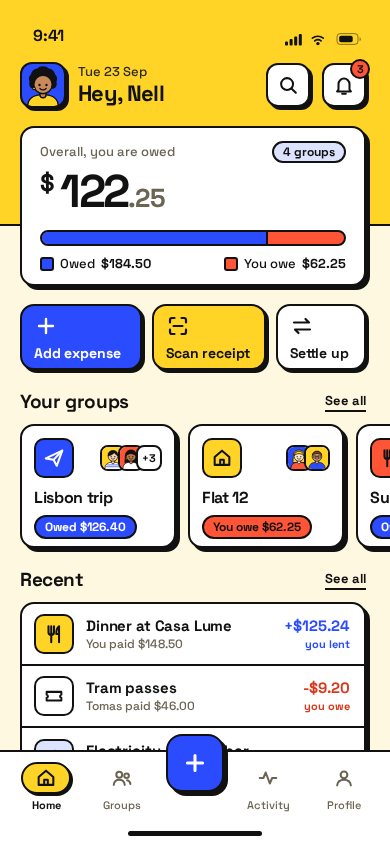
Divvy is a complete bill splitting app: welcome, sign in, a home with what you owe and are owed, groups, adding an expense with a keypad, splitting evenly or item by item from a scanned receipt, group balances, settling up with a review and a confirmation, activity, friends, spending stats, a plan, profile and settings. Bright yellow and cream with black outlines, hard shadows and one cobalt blue.
| Detail | Value |
|---|---|
| Screen type | Home |
| App | Divvy: Split bills with friends |
| Category | Finance |
| Design language | Neubrutalism, light |
| Type | Space Grotesk |
| Colours | #fff8e1 background, #ffffff surface, #111111 text, #6b6453 text-muted, #ffd426 accent, #111111 accent-contrast, #2b4bff secondary, #111111 border, #ff5436 danger |
What this screen says
- Tue 23 Sep
- Hey, Nell
- Overall, you are owed4 groups
- Owed $184.50 You owe $62.25
- Add expense
- Scan receipt
- Settle up
- Your groupsSee all
- Lisbon trip
- Owed $126.40
- Flat 12
- You owe $62.25
- Supper club
- Owed $58.10
- RecentSee all
- Dinner at Casa Lume
- You paid $148.50
- +$125.24you lent
- Tram passes
- Tomas paid $46.00
- -$9.20you owe
- Electricity, September
- Home
- Groups
- Activity
- Profile
Around it in Divvy
More home screens
- Compound Home: Mutual funds and SIPs
- Halden Home: Premium neobank
- Billable Home: Time tracking and invoices, kept like a ledger
- Lease Home: Your tenancy, drawn to plan
- Claim Home: Expenses, filed like a till receipt
- Tally Home: Monthly budgeting
- Ticker Home: Stock investing
- Burrow Home: Shared savings pots
- Remit Home: International money transfer
- Piggy Home: Pocket money for kids
- Settle Home: Bill payments and banking
- Fathom Home: Crypto wallet
What makes a good home screen
- Put the most important thing first. Decide the one thing most people come for, like today's workout, a balance or the next booking, and give it the top of the screen.
- Make it feel current. Greetings with the time of day, today's date, fresh numbers and recent activity tell people the app is alive and about them.
- Keep quick actions within thumb reach. The two or three things people do most should be one tap away, in the lower part of the screen or a floating button.
- Group related content in clear sections. Use headings and spacing so the screen scans as a few blocks, not a long mixed list.
The full home screen guide and every example
Remix Divvy free: describe your own app and it is drawn in this design. Or get its files from $10: Figma, React Native, SwiftUI, Flutter and HTML.