Templates · Home screens · Productivity app · Beam
Beam Home screen
A home screen from Beam, a send big files app template in a Playful style. Screen 4 of 25.
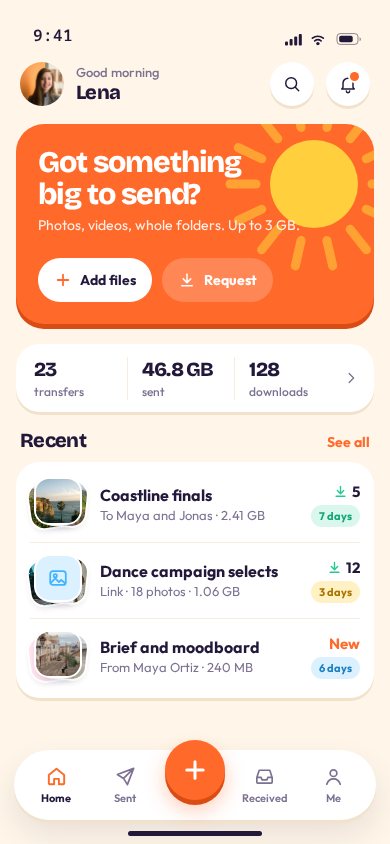
Beam is a complete big file sending app: welcome, sign in and a code, a home with a drop zone and recent transfers, picking photos and files, a new transfer by email or link with a message, expiry and password options, a live upload, sent and link ready screens, sent transfers with download counts, a transfer with who downloaded what, stats, received transfers, the receiver's download page, a photo preview, a password lock, search, file requests, notifications, a Plus plan with checkout, a branded download page, profile and settings. Warm cream with tangerine, sun yellow and grape ink.
| Detail | Value |
|---|---|
| Screen type | Home |
| App | Beam: Send big files |
| Category | Productivity |
| Design language | Playful, light |
| Type | Bricolage Grotesque for headings, Outfit for text |
| Colours | #fff6e9 background, #ffffff surface, #22183a text, #7b7191 text-muted, #ff6a2b accent, #ffffff accent-contrast, #ffcf3d secondary, #f1e2cc border, #ef4b5f danger |
What this screen says
- Good morningLena
- Got something
- big to send?
- Photos, videos, whole folders. Up to 3 GB.
- Add files Request
- 23transfers
- 46.8 GBsent
- 128downloads
- Recent
- See all
- Coastline finalsTo Maya and Jonas · 2.41 GB
- 57 days
- Dance campaign selectsLink · 18 photos · 1.06 GB
- 123 days
- Brief and moodboardFrom Maya Ortiz · 240 MB
- New6 days
- Home
- Sent
- Received
- Me
Around it in Beam
More home screens
- Staffroom Home: HR, payslips and time off
- Slot Home: Booking links and meeting scheduling
- Sheet Home: Spreadsheets and databases
- Tunnel Home: VPN and online privacy
- Ping Home: Internet speed test
- Glance Home: Visual search with the camera
- Replay Home: Record and share screen videos
- Easel Boards: Collaborative whiteboard
- Token Codes: Two-factor codes and sign-in approvals
- Parchment Home: Documents, edit and share
- Lectern Home: Slides and presenter remote
- Ringer Favourites: Phone, contacts and voicemail
Every productivity app home screen
What makes a good home screen
- Put the most important thing first. Decide the one thing most people come for, like today's workout, a balance or the next booking, and give it the top of the screen.
- Make it feel current. Greetings with the time of day, today's date, fresh numbers and recent activity tell people the app is alive and about them.
- Keep quick actions within thumb reach. The two or three things people do most should be one tap away, in the lower part of the screen or a floating button.
- Group related content in clear sections. Use headings and spacing so the screen scans as a few blocks, not a long mixed list.
The full home screen guide and every example
Remix Beam free: describe your own app and it is drawn in this design. Or get its files from $10: Figma, React Native, SwiftUI, Flutter and HTML.